
Email marketing metrics grouped by the job they do
| Metric job | Metrics to watch | Formula/source | What it diagnoses | What not to overread |
|---|---|---|---|---|
| Delivery | Delivery rate, bounce rate, spam complaint rate, inbox placement | ESP reports, seed tests, postmaster tools | Whether the email had a fair chance to be seen | Delivery rate does not prove inbox placement or attention |
| Engagement | Open rate, click rate, CTR, CTOR, replies, forwards | Opens / delivered; clicks / delivered | Subject line pull, audience interest, offer clarity | Opens are weaker after Apple Mail Privacy Protection |
| Conversion | Conversion rate, order rate, demo requests, form fills | Analytics, ecommerce, CRM, ESP attribution | Whether clicks became the intended action | Last-click can hide assist value |
| Revenue | Revenue per email, revenue per recipient, AOV, ROI | Ecommerce, CRM, finance data, ESP attribution | Whether the program pays for itself | ESP-attributed revenue may not match finance revenue |
| List health | Unsubscribe rate, complaint rate, inactive rate, list growth, churn | ESP reports and list hygiene tools | Whether the audience still wants the mail | Low unsubscribes can hide quiet disengagement |

Campaign Monitor, Mailchimp, Improvado, Bloomreach, and Knak all cover useful email metrics, but long checklist dashboards make decision-making weird. A founder asking “did email work?” needs a different answer than a lifecycle marketer asking “why did this flow underperform?”
Use marketing metrics for the broader measurement system, then use email scorecards and email marketing benchmarks to compare performance by send type, industry, and measurement method. Benchmarks need caveats: Brevo reports 2026 averages of 20.73% open rate, 2.27% click-through rate, and 0.46% unsubscribe rate, while B2B studies show a 15.1% to 55.71% open-rate range. One dashboard number should not run the meeting.
The formulas to standardize before you compare reports
Different ESPs use different labels, especially for click rate, CTR, and CTOR. Before comparing Mailchimp to Klaviyo, HubSpot to Campaign Monitor, or agency reports to an internal dashboard, define the denominator. Otherwise, everyone argues over numbers that were never measuring the same thing.
| Metric | Formula | Denominator note |
|---|---|---|
| Open rate | Unique opens / delivered emails x 100 | Use delivered, not sent. See good email open rate and average email open rate. |
| Click rate | Unique clicks / delivered emails x 100 | Many ESPs call this CTR. Confirm before reporting. |
| CTR | Unique clicks / delivered emails x 100 | If a report uses total clicks, label it clearly. |
| CTOR | Unique clicks / unique opens x 100 | Useful for creative and offer relevance, but it inherits open-tracking problems. |
| Conversion rate | Conversions / chosen denominator x 100 | State whether you mean delivered emails, clicks, sessions, or something else. See email marketing conversion rate. |
| Bounce rate | Bounced emails / sent emails x 100 | Bounce uses sent. A roughly 2% bounce rate is a common all-industry benchmark, but vendor benchmarks are directional. |
| Spam complaint rate | Spam complaints / delivered emails x 100 | A complaint happens when someone hits Report Spam. Stay under 0.1%; 0.3% can signal issues. |
| Unsubscribe rate | Unsubscribes / delivered emails x 100 | Some teams use active subscribers. Delivered is cleaner for campaign reporting. |
| Revenue per email | Attributed revenue / emails sent or delivered | Pick one and keep it consistent. Finance may use stricter revenue than the ESP. |
| Email ROI | (Email revenue − email cost) / email cost x 100 | Include platform, creative, agency, discount, and production costs when possible. |
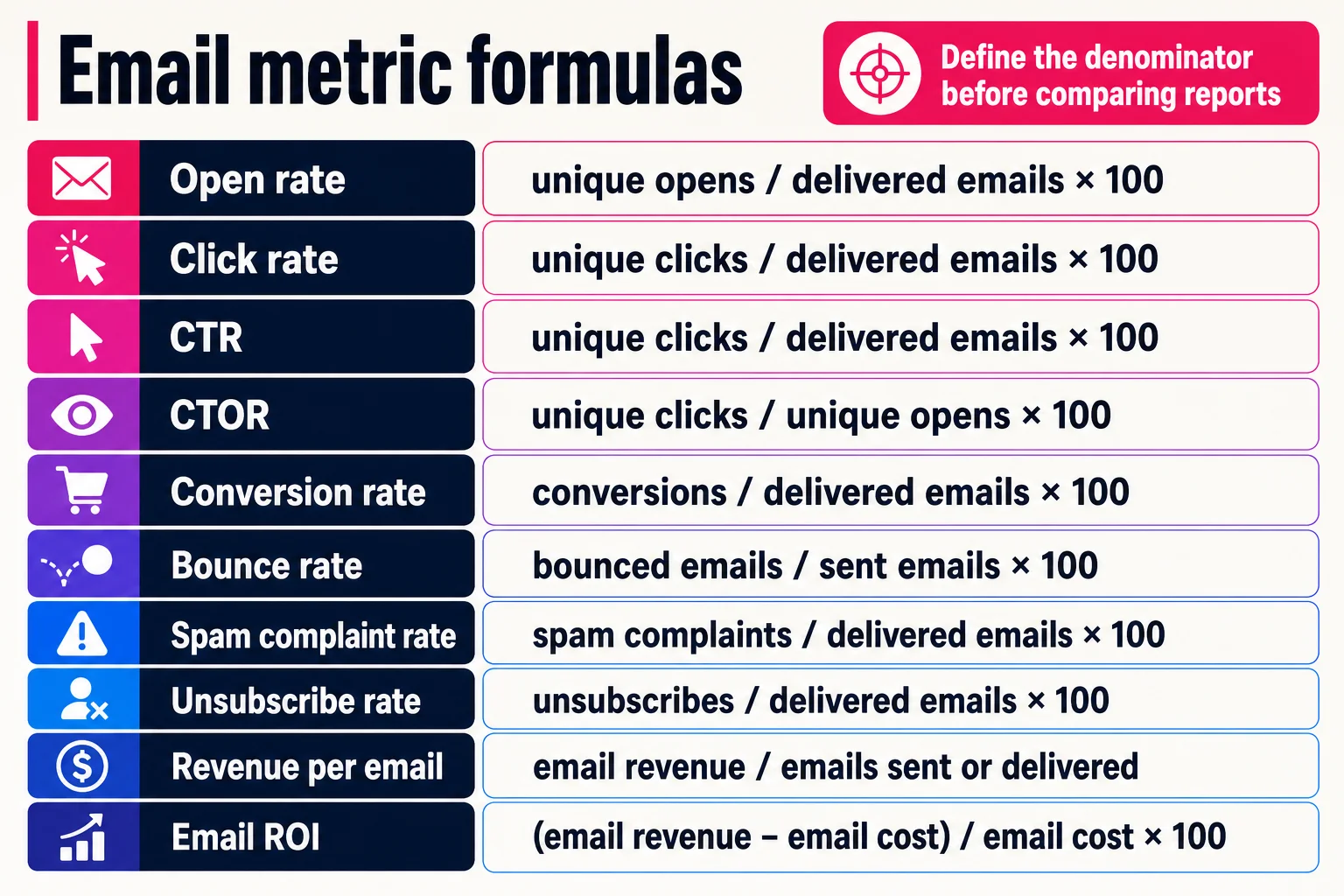
In this guide, CTR means unique clicks divided by delivered emails, which matches how marketers usually discuss good email click rate and average email click rate. CTOR asks a narrower question: among people counted as openers, how many clicked?
For deliverability, dashboard colors can be too comforting. Amazon treats bounce and complaint rates as account-wide risk signals, with bounce rates of 5% or more triggering reviews, 10% potentially causing sending pauses, and complaint rates above 0.5% potentially causing temporary pauses. Those are enforcement thresholds, not universal benchmarks, but they show why denominator discipline matters.
Use email marketing metrics in the order problems appear
Start at the top of the path, because a weak downstream number can come from an upstream failure.
First, check delivery. Bounce rate, delivery rate, spam complaint rate, and inbox placement signals tell you whether the email reached people at all. If bounces or complaints jump, pause list growth, review acquisition sources, suppress risky segments, and check authentication and sending patterns. Campaign Monitor, Mailchimp, Bloomreach, Knak, and Improvado all surface versions of these metrics, but separate deliverability from engagement so you do not blame copy for a mailbox problem.

Next, check engagement. Open rate can flag subject line, sender name, timing, or audience fit issues, but treat it as a soft metric because Apple Mail Privacy Protection can mask IP addresses and load remote content privately, which affects open tracking. Click rate and CTR usually tell you more. CTOR can compare creative among counted openers, but it has the same caveat. If clicks are weak, test the offer, CTA clarity, message match, and landing-page promise.
Then check conversion and revenue. Conversion rate shows whether the click became the intended action. Conversions divided by clicks point to landing-page or offer friction. Conversions divided by delivered emails judge campaign efficiency. For commercial emails, revenue per email and email ROI show whether the send paid for itself. If ROI lags while clicks look healthy, inspect discounting, attribution windows, average order value, and post-click conversion.
Last, check list health. Watch unsubscribe rate, complaint rate, inactive subscribers, and engagement decay. If those worsen, reduce frequency for low-intent segments, tighten signup expectations, and stop treating every address like it belongs to you forever.
Add caveats before you trust opens, clicks, and benchmarks
Apple says Mail Privacy Protection can hide IP addresses and load remote content privately, so opens can be inflated or blurred for some subscribers. Opens still help with subject lines, send times, segments, and trends, but they should not carry the KPI alone.
| Metric | Main caveat | Sanity-check with |
|---|---|---|
| Open rate | MPP can overstate or blur opens | Clicks, conversions, revenue per email |
| CTOR | MPP can distort the open-based denominator | CTR, clicks per delivered email |
| CTR | Security scanners and bots can create non-human clicks | Instant clicks, every-link clicks, odd user agents, zero session activity |
| Benchmarks | Vendor datasets reflect their own customers, industries, and definitions | Your 90-day baseline, segment, offer, and send type |
Use benchmarks as context. If you cite industry numbers, name the dataset, such as Brevo, Mailchimp, Klaviyo, or Salesforce, and keep ClickMinded’s interpretation separate. For reference points, see our email marketing statistics, newsletter statistics, and email marketing benchmarks.
Match the KPI set to the email type
A promo, lifecycle flow, and newsletter may share one ESP dashboard, but they are doing different jobs.
| Email type | Primary KPIs | Secondary checks | Watch out for |
|---|---|---|---|
| One-off campaign | CTR, conversion rate, revenue per email | Open rate, CTOR, unsubscribes, spam complaints | Revenue alone can hide weak segmentation |
| Automated flow | Revenue per recipient, conversion rate, completion rate | Time to conversion, drop-off by step, bounce rate | Attribution windows can over-credit flows near purchase |
| Newsletter | Click rate, engaged subscriber rate, retention | Opens, replies, unsubscribes | Privacy changes make opens fragile, so pair them with clicks and retention |
For newsletter reporting, use the ClickMinded newsletter open rate guide and the average newsletter open rate companion page.
Executive email dashboard for business impact and risk
| Metric | Cadence | Source type |
|---|---|---|
| Delivered volume | Weekly/monthly | ESP |
| Deliverability risk: bounces, inbox warnings | Weekly | ESP or deliverability tool |
| Click rate or CTR | Weekly | ESP, with bot-click caveat |
| Conversion rate | Weekly/monthly | ESP, analytics, or CRM |
| Revenue per email | Monthly | Commerce or CRM |
| Email ROI | Monthly | ClickMinded calculation structure |
| Unsubscribes and spam complaints | Weekly | ESP |
| Net subscriber change | Monthly | ESP or CRM |
ClickMinded helps with interpretation and reporting structure, not ownership of your data. If revenue rises while complaints climb, say the quiet part clearly: email drove more sales, but list tolerance is weakening. Tighten targeting before scaling volume.

Quick answers to common email metrics questions
What are the most important email marketing metrics? Track delivery, click rate, conversion rate, revenue per email, email ROI, unsubscribes, complaints, and bounces. The broader marketing metrics view matters more than one ESP number.
Is open rate still useful? Yes, as a diagnostic. Apple says Mail Privacy Protection can hide IP addresses and make open tracking less reliable.
What is the difference between CTR and CTOR? CTR is clicks divided by delivered emails. CTOR is clicks divided by opens.
What is a good email click rate? Compare your results with email marketing benchmarks and your own history.
How do you calculate email marketing ROI? Email ROI = (email revenue minus email cost) / email cost x 100.