Free Tool
Da Button Factory — Free CTA Button Generator
Design custom call-to-action buttons for your website, email, or social media post. Download the image or grab the CSS code.
What Is Da Button Factory?
Da Button Factory is a simple button design tool that helps you create high-converting call-to-action (CTA) buttons for your website, blog post, social media post, or email.
Da Button Factory has been acquired by ClickMinded! The tool has been upgraded and will remain free. It's now a call-to-action button generator for ClickMinded users.
We recommend you use the latest versions of Chrome, Firefox, Edge, or Safari to use this tool. You might run into issues if you use Internet Explorer — if so, just download one of the recommended browsers.
How to Add Your Button to a Website, Email, or Social Media Post
Option 1: Download the Button Image File
This is the most straightforward way. Just pick your preferred file type and hit the download button.
Next, upload your button image to your website, your email service provider, or use it in your social media images.
Option 2: Implement the Button as HTML + CSS
Da Button Factory is also a free CSS button generator. This option requires a bit more knowledge of HTML and CSS, but it will result in a faster web page or email (since there's no need to load an image).
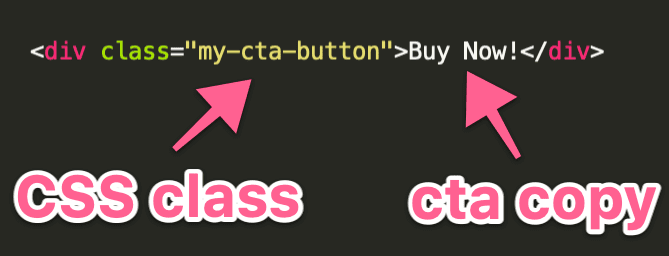
To do this, create an HTML element like <div> or <button>, write the CTA copy, and assign a class to it. For example, you could call the class my-cta-button.
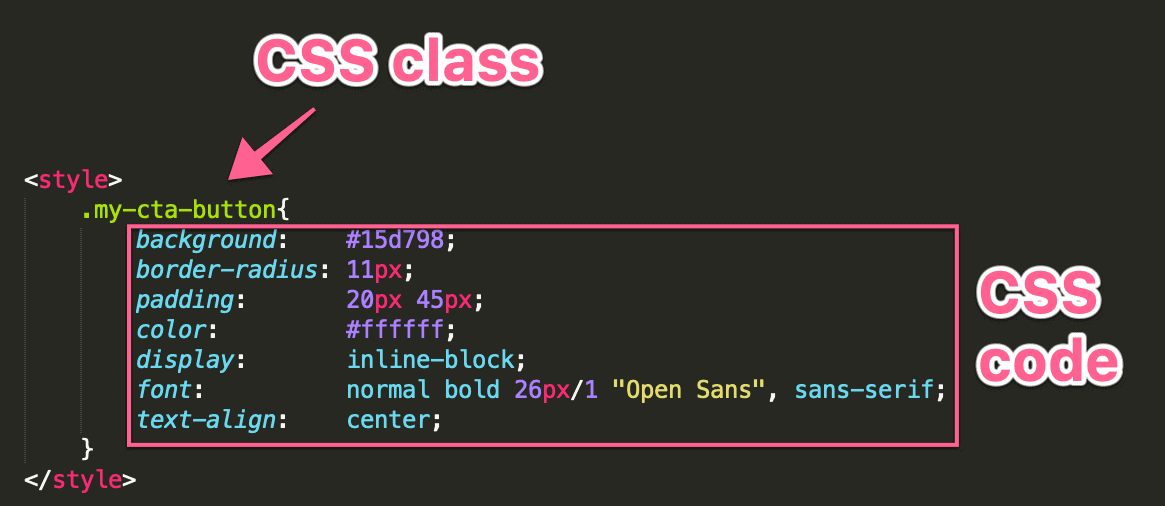
Next, copy the CSS code provided by the tool under the "Embed" option, and add it either to your CSS file or to the page using <style> tags.
That's it! You now have designed and implemented your own HTML button.
How to Create High-Converting CTAs
Here are some best practices you can follow to make sure your CTAs drive your users to take action:
- Use a design that stands out. Make sure there's enough contrast between the button text and its background, as well as between the button and the background of the page.
- Tell users exactly what they get. Instead of something generic like "Click here", be descriptive with copy like "Buy now" or "Download".
- Use the first person. It's better to use "View my account" instead of "View your account".
- Keep it short. Avoid creating unnecessarily wordy CTAs.
- Make the offer attractive. Include terms like "Now", "Free", or "Save". For example: "Download NOW", "Get FREE Ebook", or "Save 10%".
Your Turn
Da Button Factory by ClickMinded is an online button maker that allows you to create beautiful, high-converting CTA buttons for websites, email campaigns, or social media posts, in no time and for free.
Start with the model displayed above, tweak the style to fit your needs, and implement the buttons you created to grow your business or website.
Even More Resources
If you're new to SEO and online marketing, be sure to check out these resources: