
Your landing page has one job, and it’s probably not the one you think
Someone clicks a Facebook ad for “affordable CRM software,” lands on a page that opens with “Transforming the Way Teams Work Together,” and leaves in eight seconds. The copy isn’t bad. It’s just answering a question nobody asked.
Use the guide below to pressure-test your page. If you want the first draft written for you, the generator will turn the same logic into headline, subhead, proof, objection, and CTA copy.
For adjacent acquisition assets, pair this with the digital advertising strategy guide before you send paid traffic, or the cold email template guide if the page is the destination for outbound outreach. If you just need the page copy now, the sales copy generator will produce the first draft.
That’s the real problem with most landing page advice. It treats copywriting as a writing problem — which words sound most convincing. It’s actually a decision-making problem. Before you write a single word, you need to know who just arrived, what they believe right now, and what specific action you want them to take next.
Unbounce’s analysis of 41,000 landing pages puts the median conversion rate at 6.6%, but that collapses fast when you split by context. Professional Services pages sit around 9.3%. B2B SaaS drops to 3.8%. Email traffic converts at roughly 19%; paid social around 12%. The copy matters, but it matters inside those conditions.
So when people ask whether their headline should be clever or clear, the answer depends entirely on the visitor’s mindset at arrival. A cold ad click and a warm email subscriber need completely different things from the same offer.
Five pieces of copy, one job each
The formula is not a secret. It’s just a sequence with a specific reason for each step, and most pages skip the reasoning, which is why they use the formula wrong.
The structure: headline, subheadline, benefit bullets, social proof, CTA. Here’s what each one is actually doing.
Headline. Its job is to tell the right visitor they’re in the right place. That means naming either what they’ll get or who this is for, preferably both. “Project management software” fails this test. “Client reporting for solo consultants, done in under five minutes” passes it. Unbounce’s research on outcome-oriented phrasing found conversion lifts above 40% over question-based or neutral alternatives, though the exact sample sizes aren’t published. Treat that figure as directional, not gospel.
Subheadline. Its job is to handle the first obvious objection or fill the gap the headline left open. Keep it to two or three lines. If your headline says “done in under five minutes,” the subheadline is where you say how.
Benefit bullets. Their job is not to list features. Each bullet should complete the sentence “This means you can…” A weak bullet says “Automated reporting.” A strong one says “Send polished client reports every Friday without touching a spreadsheet.”
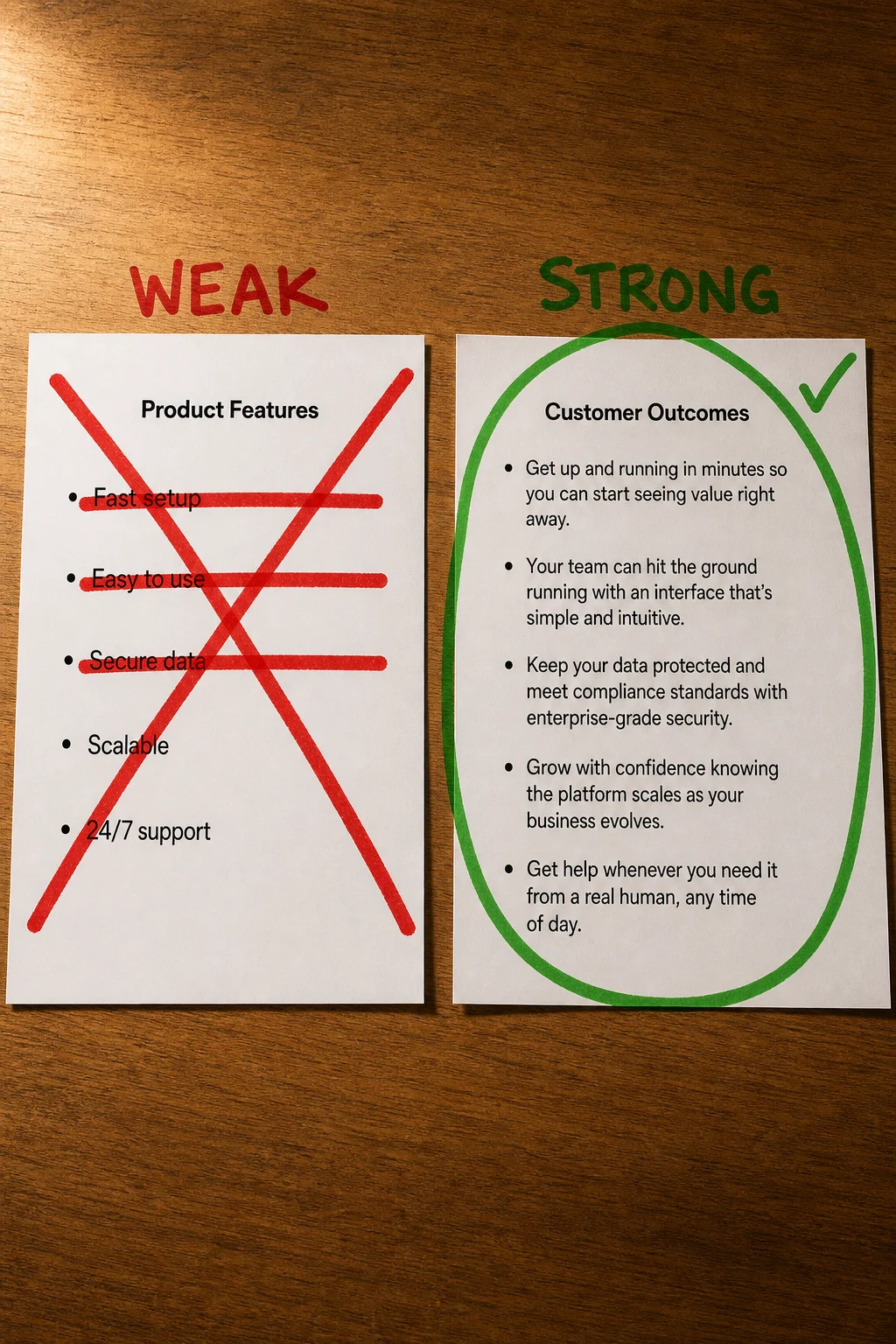
Social proof. Its job is to lower the perceived risk of the action you’re about to ask for. A logo wall alone doesn’t do this. A short quote from a named person at a company your visitor recognizes, tied to a specific result, does. Appcues puts testimonials from SalesLoft and Jostle directly beside their trial CTA, not buried below the fold.
CTA. Its job is to make the next step obvious. High contrast color, button copy that names the outcome (“Start my free report”), and placement above the fold. “Submit” is not button copy. It describes your server, not their life.
The formula works because it mirrors how a skeptical visitor thinks: What is this? Does it do what I need? Can I trust it? Fine, I’ll try it. Mess up the order or skip a step, and you break that chain.
Writing for “anyone” is a choice, and it costs you
The formula from the previous section only works if you know who you’re writing each element for. Without that, you’re making decorative decisions, not strategic ones.
Generic pages tend to stagnate around 3% conversion because the copy can’t be specific enough to feel relevant to any one visitor. Narrow the audience to a single well-defined persona, and that same page structure can pull dramatically higher, sometimes into double digits, though the honest caveat is that most of those figures come from vendor case studies without published sample sizes. Treat the direction as reliable; treat the exact numbers as rough.
The tradeoff is real, though. A tightly persona-specific page will often attract 50-80% less traffic than a broad one. You’re betting on conversion rate instead of volume, and that only pays off if your traffic source actually matches the persona you wrote for.
Here’s what the same offer looks like on either side of that decision:
Too broad: “Project management software for teams of all sizes.”
Specific: “Ditch the status-meeting. Project tracking for remote engineering teams who are already in Slack all day.”
The second version will lose people who aren’t remote engineering teams. That’s the point.
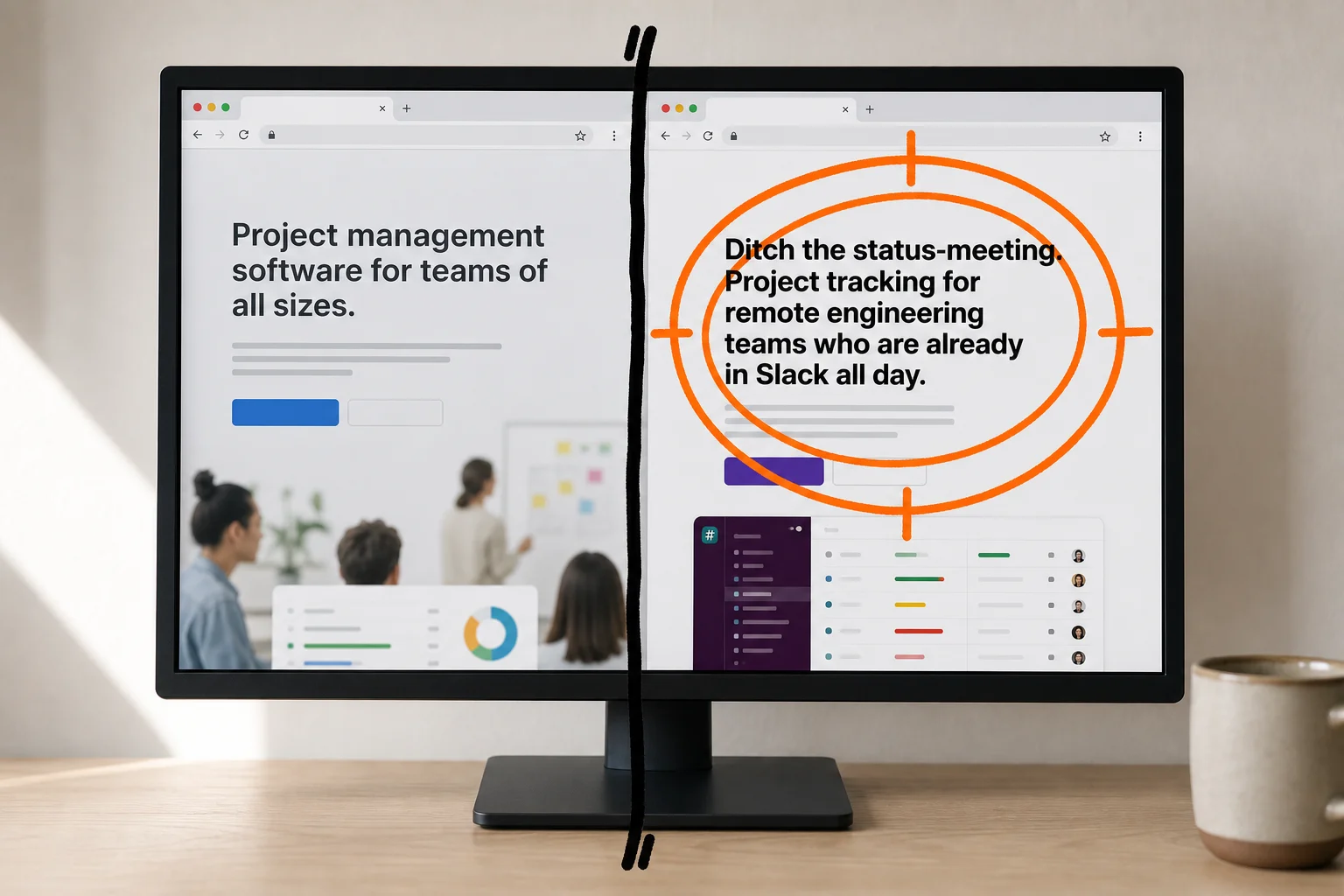
If you have one audience, write one page for them. If you genuinely serve several, build separate pages rather than softening the copy until it fits everyone and resonates with no one.
Four ways to lose a visitor in under ten seconds
Starting the headline with your company name. Founders are proud of what they built, which is understandable and irrelevant to a visitor who landed thirty seconds ago from a paid ad. Unbounce flags this directly: a headline like “eBook Design and Launch” tells the visitor what you do, not what they get. The fix is writing toward the outcome: “Launch a professional eBook in a weekend, even if you’ve never designed one.”
Treating the CTA as an afterthought. “Submit” is the worst button label in existence because it describes what the visitor does *for you*, not what they receive. One A/B test found “Get My Free Audit” outperformed “Submit” by 30 to 40 percent. Specific language removes uncertainty about what happens next.
Using testimonials that prove nothing. “Great product, highly recommend!” is decorative. It answers none of the questions a skeptical visitor is actually asking: Who are you? What changed? By how much? A testimonial with a name, a role, a company, and a specific result does persuasion work. The vague kind fills vertical space.
Writing for everyone who might possibly visit. Copy that hedges to avoid alienating anyone ends up speaking to no one with any conviction.
Pick the right skeleton before you write a word
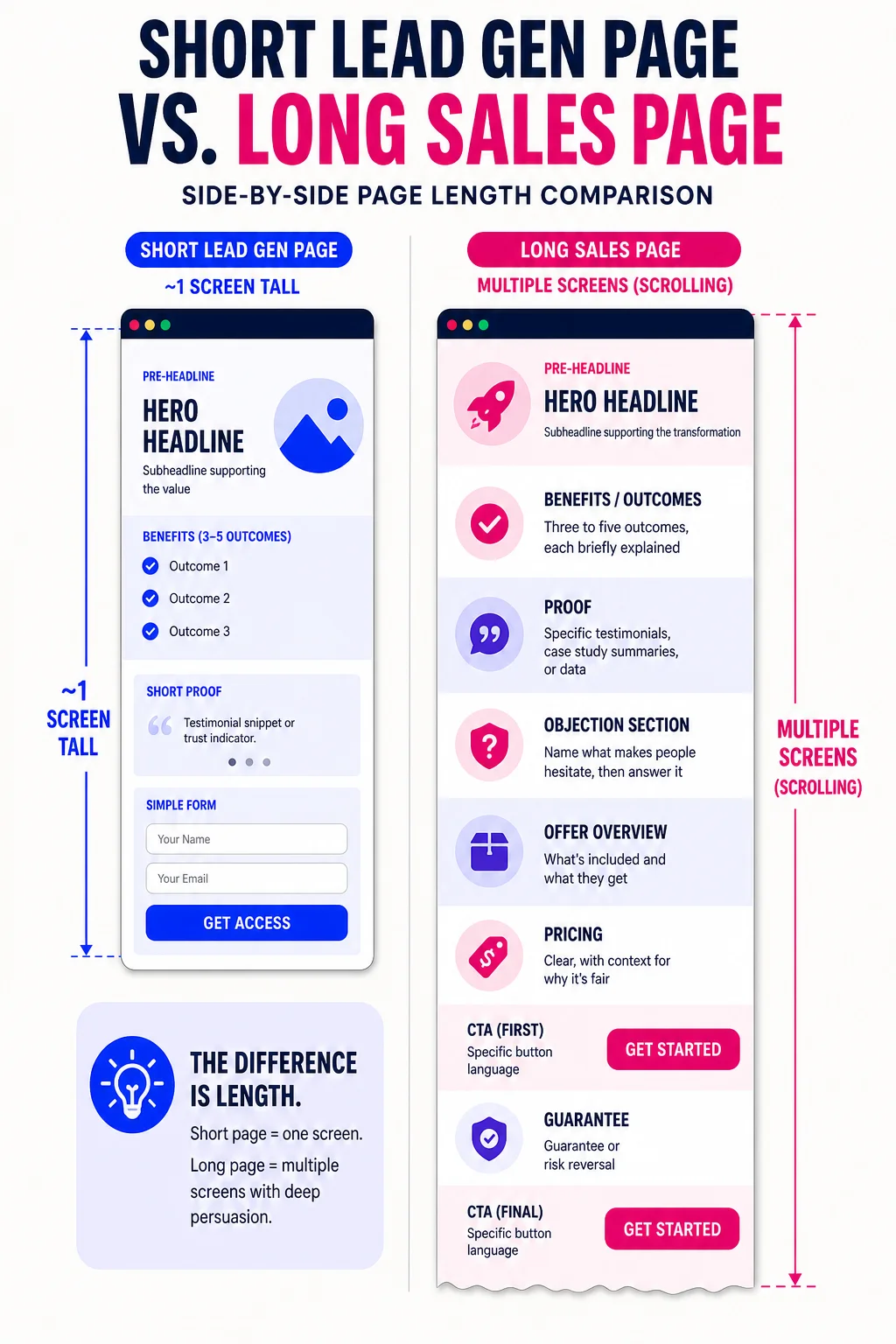
The four mistakes above share a common cause: writers start typing before they’ve decided what kind of page they’re building. A free-guide opt-in needs a genuinely different structure than a $900 course, and forcing the same template onto both is where pages go soft.
Template 1: Lead gen page (free offer, cold or paid-social traffic, list-building)
Keep it short, 200 to 500 words. The visitor owes you nothing yet, so every extra field or paragraph is a reason to leave.
- Pre-headline: one line naming the exact audience (“For freelance designers who…”)
- Hero headline: the specific outcome they get
- Subheadline: handle the obvious objection or fill in the “how”
- Form: name and email only
- CTA button: what they receive, not what they do (“Send me the guide”)
- Social proof: one or two lines, a number or a name, just above or below the form
Template 2: Product or sales page (higher-priced offer, warm or retargeted traffic)
Expect 2,000 words or more. The visitor needs to feel understood before they spend money.
- Hook: the problem in the visitor’s own language
- Solution: what the product is and how it works
- Benefits: three to five outcomes, each briefly explained
- Proof block: specific testimonials, case study summaries, or data
- Objection section: name what makes people hesitate, then answer it
- Pricing: clear, with context for why it’s fair
- CTA: repeated at least twice, with specific button language
- Guarantee or risk reversal
Template 3: Webinar or event registration page (time-sensitive offer, cold and warm traffic)
The event does the persuasion. The page just needs to answer “is this for me?” and “when is it?” fast.
- Pre-headline: audience callout
- Hero headline: what they’ll learn or be able to do after
- Speaker visual and one-line credibility note
- Benefit bullets: three to five, outcome-focused
- Form: name and email only
- Date, time, and time zone, visible without scrolling
- Urgency line: seat limit or deadline if it’s real
- Repeated CTA at the bottom
The webinar page structure leans on the speaker visual and the date because those two elements answer the visitor’s first two questions before they read anything else.
Fix the offer before you touch the button color
Before you run a single A/B test, check whether you’re even measuring conversions correctly. A surprising share of pages have broken tracking, which means you’d be optimizing against bad data from the start.
If tracking is clean, ask whether the traffic matches the page. A bounce rate above 60% or scroll depth that never reaches your CTA usually means audience mismatch, not weak copy.
Only after those two checks does the copy itself become the suspect. Is the offer clear? Does the headline state a specific outcome? If not, rewrite those before testing anything.
Headlines and CTAs are where A/B tests actually move numbers. Button color is last on the list, not first.
Write one sentence your visitor would say, not you
Open your current headline. Now write one sentence, from your visitor’s point of view, that completes this prompt: “After I use this, I will __.”
If your headline doesn’t match what you just wrote, that gap is your copy problem. Not the button color, not the font, not the layout. A MarketingSherpa case study found that shifting a headline from brand framing to visitor outcome produced a 321% conversion lift. The sentence you just wrote is your new headline draft. Start there.