
45% of our revenue comes from email. Here’s the system behind it.
Over 45% of ClickMinded’s revenue comes from email marketing. Not from paid ads, not from SEO, not from social. Email. That number is worth sitting with for a second before we get into the how.
Now picture the opposite of what produces that result. It’s Monday morning. Someone at the company opens their ESP, selects the entire list, drops in last week’s blog post, and hits send. No segmentation, no automation, no sequence built around where subscribers actually are in their relationship with the brand. Just a blast to everyone, all at once, hoping something sticks. Mailchimp’s benchmark data puts average click-through rates near 2-3% across industries. That’s the ceiling most batch-and-blast programs ever reach, and plenty never get there.
The problem isn’t email as a channel. The problem is that most email “programs” are really just a list and a compose button. No welcome sequence that earns trust before asking for anything. No behavioral triggers that fire when someone actually shows intent. No segments that separate the person who bought twice last month from the person who signed up two years ago and opened exactly one email. Everyone gets the same thing, and the results show it.
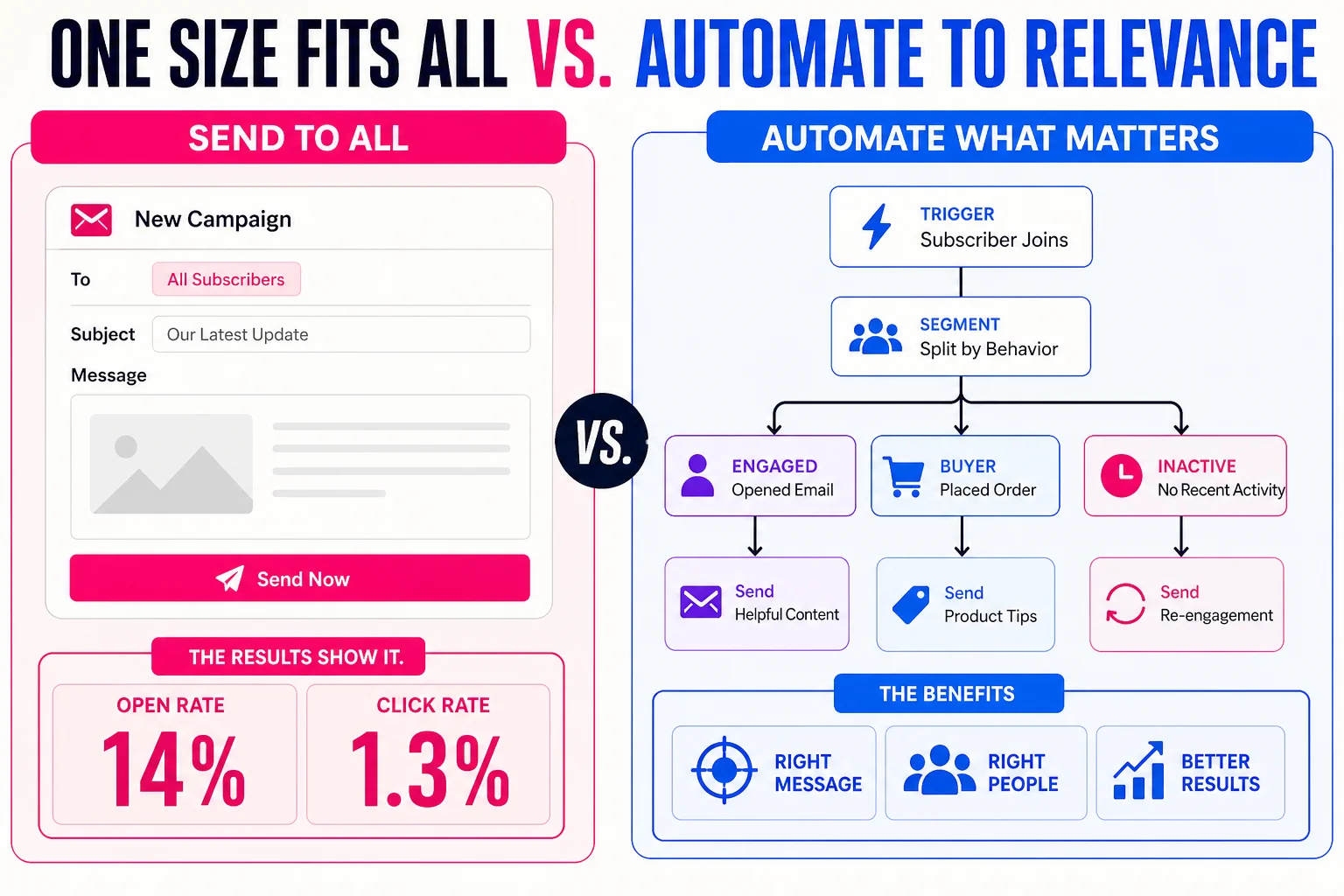
This guide fixes that. It’s a 10-step system built on the same architecture ClickMinded uses to run email as its primary revenue channel across a list that has grown well past 100,000 subscribers. Every step is platform-neutral, meaning the framework works whether you’re on Klaviyo, ActiveCampaign, Kit, Mailchimp, or anything else. You’ll get the full automation blueprint with actual flow architecture, honest guidance on deliverability, and a measurement approach that reflects how email actually works after Apple’s iOS 15 privacy update broke open rate as a reliable signal.
Before you read further, grab the free strategy template. It maps the full system so you can implement as you go.
Here’s what the 10 steps cover:
- Audit your current email program so you know exactly what’s broken before you build anything new.
- Set goals tied to revenue, not vanity metrics.
- Choose the right ESP for your business type, with a clear framework for making the decision.
- Build your list with tactics that attract subscribers who actually want to hear from you.
- Segment from day one, starting simple and getting more specific as your data improves.
- Build the six automations every email program needs, with full flow architecture and sample subject lines for each.
- Write emails people open and click, without relying on tricks that stop working after one send.
- Personalize without being unsettling about it.
- Fix your deliverability before it quietly kills your results.
- Measure what actually matters after iOS 15, with a reporting cadence you’ll use every week.
If you have an ESP set up but no documented strategy, start at Step 1. If you’re building a lifecycle program from scratch for a B2B SaaS product, Step 3 and Step 6 will do the most work for you. If you’re an e-commerce operator who’s been living on campaign blasts, Step 5 and Step 6 are where the money is.
Every step builds on the one before it. By the end, you’ll have a complete, documented email system, not just a longer list of things to try.
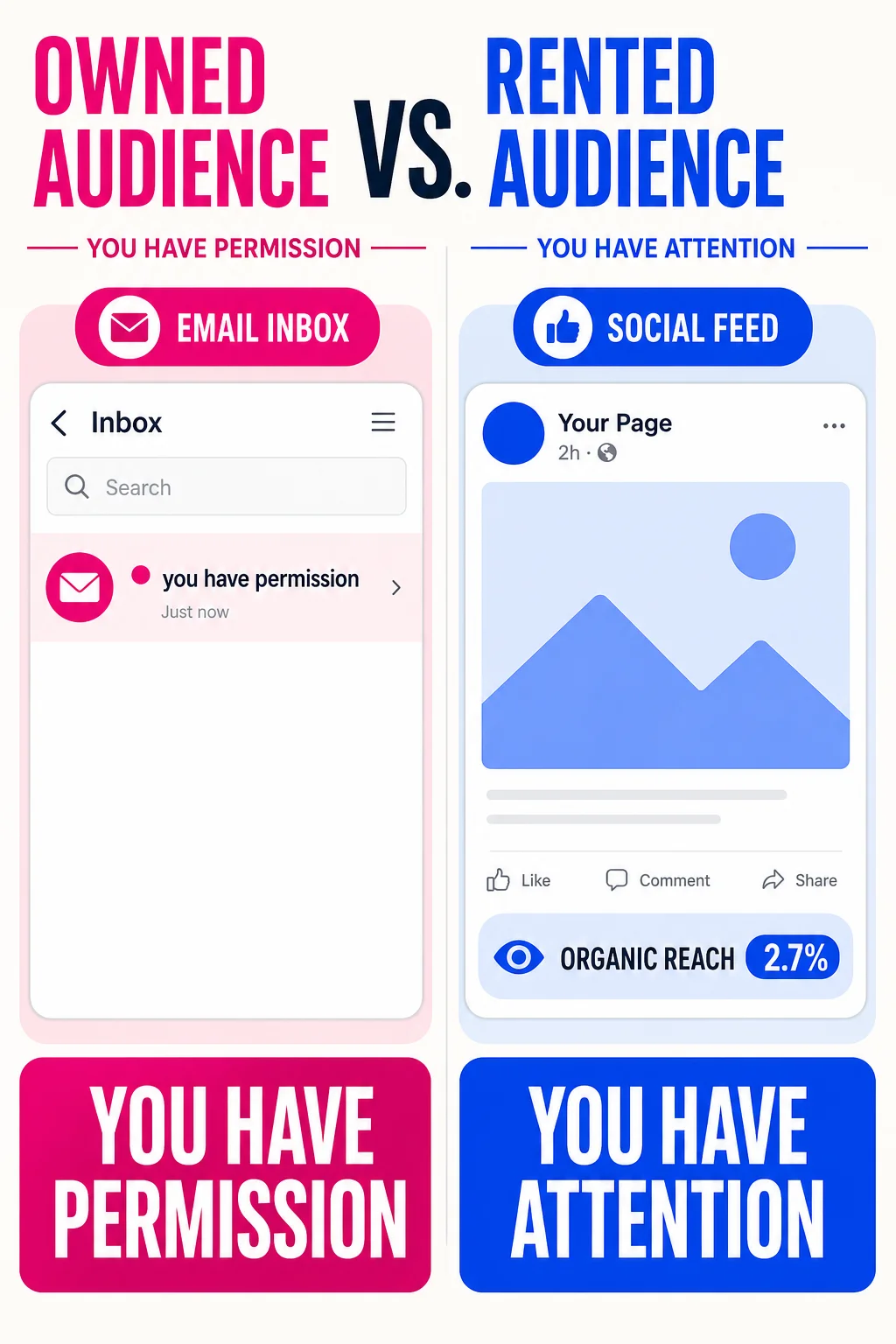
Your Instagram following disappears overnight. Your email list doesn’t.
A platform can cut your organic reach by 80% with an algorithm update, and there’s nothing you can do about it. An email list is yours. The subscriber gave you permission to land directly in their inbox, and that permission doesn’t expire when a social network changes its business model.
That ownership difference explains a lot of the ROI gap. Litmus’ State of Email research puts the commonly cited figure at around 36:1, meaning $36 returned for every $1 spent. That number gets repeated everywhere, and it deserves some skepticism. It comes from self-reported survey data, Litmus doesn’t publish its full methodology or sample size, and the 36:1 figure reflects what the better-run programs in their survey reported. A closer look at the distribution tells a more honest story: roughly 35% of respondents reported between $10 and $36 per dollar spent, and about 30% reported $36 to $50. If your program is a batch-and-blast operation with no automations, you’re probably not in either of those buckets yet.
What the data does consistently show is that email outperforms social on revenue per interaction. Estimates from multiple sources put email conversion around 8% versus roughly 3% for social, and subscribers spend meaningfully more time engaging with an email than with a social post. That gap exists partly because of intent. Someone who handed you their email address and confirmed their subscription is in a fundamentally different posture than someone who passively scrolled past a sponsored post.
The ownership argument also gets stronger as third-party data gets harder to use. First-party behavioral data from your email list, what someone clicked, what they bought, what they ignored, is the kind of signal that becomes more valuable as targeting options elsewhere tighten.
Strategy versus tactics versus tools
Most email programs fail not because they chose the wrong ESP, but because they never had a strategy. They have tactics (subject line formulas, send-time testing, discount codes) and they have tools (an ESP, a form builder, maybe a landing page), but nothing connecting those pieces into a system with a purpose.
A strategy answers three questions before anything else: What behavior are we trying to drive? Who specifically are we trying to drive it with? How will we know if it’s working?
The tactics serve the strategy. The tools execute the tactics. That order matters because when it’s reversed, you end up with a fully configured ESP running a single welcome email and a weekly blast, which is what most “documented” email programs actually look like.
For a broader frame on how email fits inside a full acquisition and retention system, the digital marketing strategy guide covers the channel mix in more depth.
A documented email strategy has four components that work as a continuous loop rather than a one-time setup. First, goals and planning, meaning specific revenue or behavior targets tied to the funnel stage. Second, list building and segmentation, meaning how subscribers enter your world and how you group them by intent or behavior. Third, content and automation, meaning both what you send proactively and what fires in response to subscriber actions. Fourth, measurement and optimization, meaning the metrics you track weekly and what you do when they move.
Every step in this guide maps to one of those four components. The goal is to have all four documented and connected by the time you finish, not just a longer list of things to maybe try someday.
Before you write a single email, do this
Step 1 — Audit what you already have
If you have an existing program, start with an honest accounting before changing anything. Pull your last 90 days of sends and note which automations are actually live (not just built and paused), which segments exist versus which are theoretical, what your confirmed click rates look like, and whether your DNS records (SPF, DKIM, DMARC) are verified.
The digital marketing audit template gives you a structured way to do this. If you’re starting from scratch, it works as a setup checklist. The goal is a written record of your current state so that in 90 days you can point to something that changed.
One thing to check specifically: automations that fire zero emails per week. Most programs have three or four flows that were built once and never touched again. Stale automations can hurt deliverability and conversions, so check them against your current product catalog, pricing, and messaging.
Step 2 — Set goals that connect to revenue
Open rate is not a goal. Neither is list size. Neither is “send more emails.”
A useful goal looks like: “Increase revenue per recipient on our post-purchase sequence from $0.40 to $0.70 within 90 days by adding a cross-sell email at day 14.” Specific, measurable, time-bound, tied to a behavior you can change.
Revenue per recipient (RPR) is total email-attributed revenue divided by total recipients. Example: $100,000 in attributed revenue to 50,000 recipients gives you $2.00 RPR. Attribution methods vary by ESP, so the most important thing is measuring consistently, not which formula you pick.
For a broader view of how email goals fit inside your acquisition funnel, the sales funnel strategy guide covers the full conversion architecture.
Step 3 — Choose an ESP that fits your use case
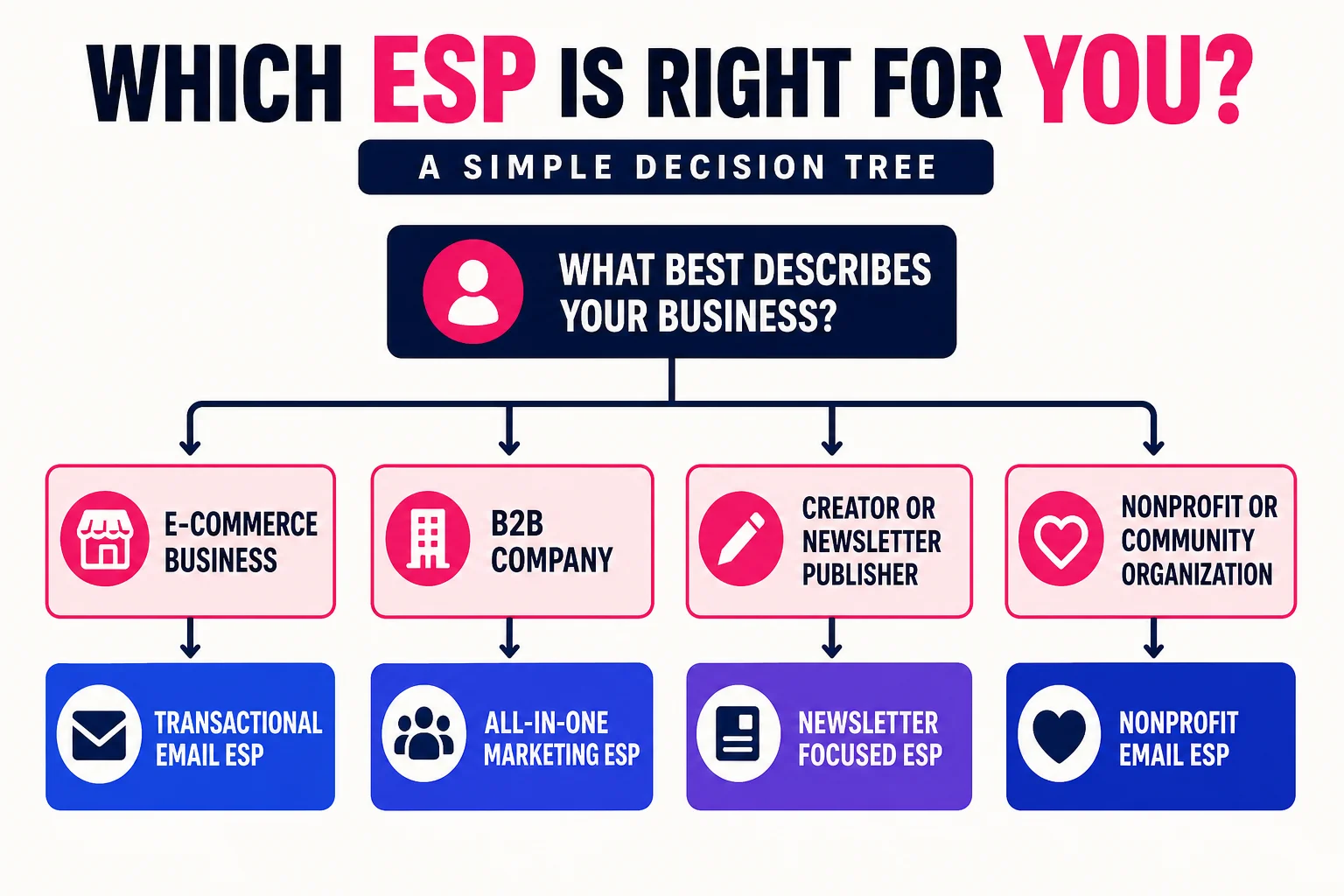
No single ESP is right for every business. Four questions narrow it down: Does it connect to your stack? Does it support the automation complexity you need? Can you afford it as your list grows? Does it report on revenue, not just opens?
Most practitioners land in a few clear use-case fits. For e-commerce, Omnisend has strong Shopify integration, built-in revenue attribution, and tends to undercut comparable options at mid-list sizes. For B2B SaaS, ActiveCampaign, Bento, or Drip handle the CRM-adjacent automation logic most SaaS programs need. For creators and newsletters, Kit’s free tier (up to 10,000 contacts) is a natural starting point; Beehiiv is worth a look if monetization and referral growth are priorities. For beginners with straightforward needs, MailerLite’s free tier (500 contacts) and low-cost scaling make it a reasonable place to start.
Whatever you pick, confirm you can export your full list at any time. Platform lock-in is a real risk.
Step 4 — Build your list with legitimate tactics only
Buying lists or scraping contacts is not a shortcut. It gets you blacklisted, damages your sender reputation, and costs money to make your program worse.
What actually works: lead magnets (a checklist, template, or short guide that solves a specific problem), opt-in forms placed at high-intent moments on your site, content gating with progressive profiling, and referral programs that let current subscribers bring in people like them. If you publish content regularly, the Newsletter Generator can turn existing posts into subscriber-facing emails that give people a reason to sign up. If outbound partnerships are part of the plan, start with a cold email template before using the Email Pitch Generator to personalize the sequence.
One placement most people underuse: the post-purchase confirmation page for e-commerce, and the post-demo thank-you page for SaaS. Both convert well because the visitor already said yes to something.
Step 5 — Segment from the start, even on a small list
On a list of 500 people, five segments will outperform one undifferentiated blast every time.
A minimum viable set: new subscribers (joined in the last 30 days), engaged subscribers (clicked at least once in the last 60 days), unengaged subscribers (no click in 90-plus days), buyers (at least one purchase or conversion), and non-buyers who are still active. That split alone lets you send different messages to people who need warming up versus people who are ready to buy again.
As your list grows, layering RFM logic (Recency, Frequency, Monetary value) adds precision. Score each dimension 1 to 5, combine them into composite segments, and your high-value recent buyers and your hibernating one-time purchasers get fundamentally different email experiences.
The six automations that do the real work while you sleep
Most email revenue doesn’t come from the campaigns you schedule and send. It comes from automations that fire without you touching anything, triggered by what a subscriber actually does. Below is the full architecture for all six flows, with exact timing, email counts, goals, and subject line examples.
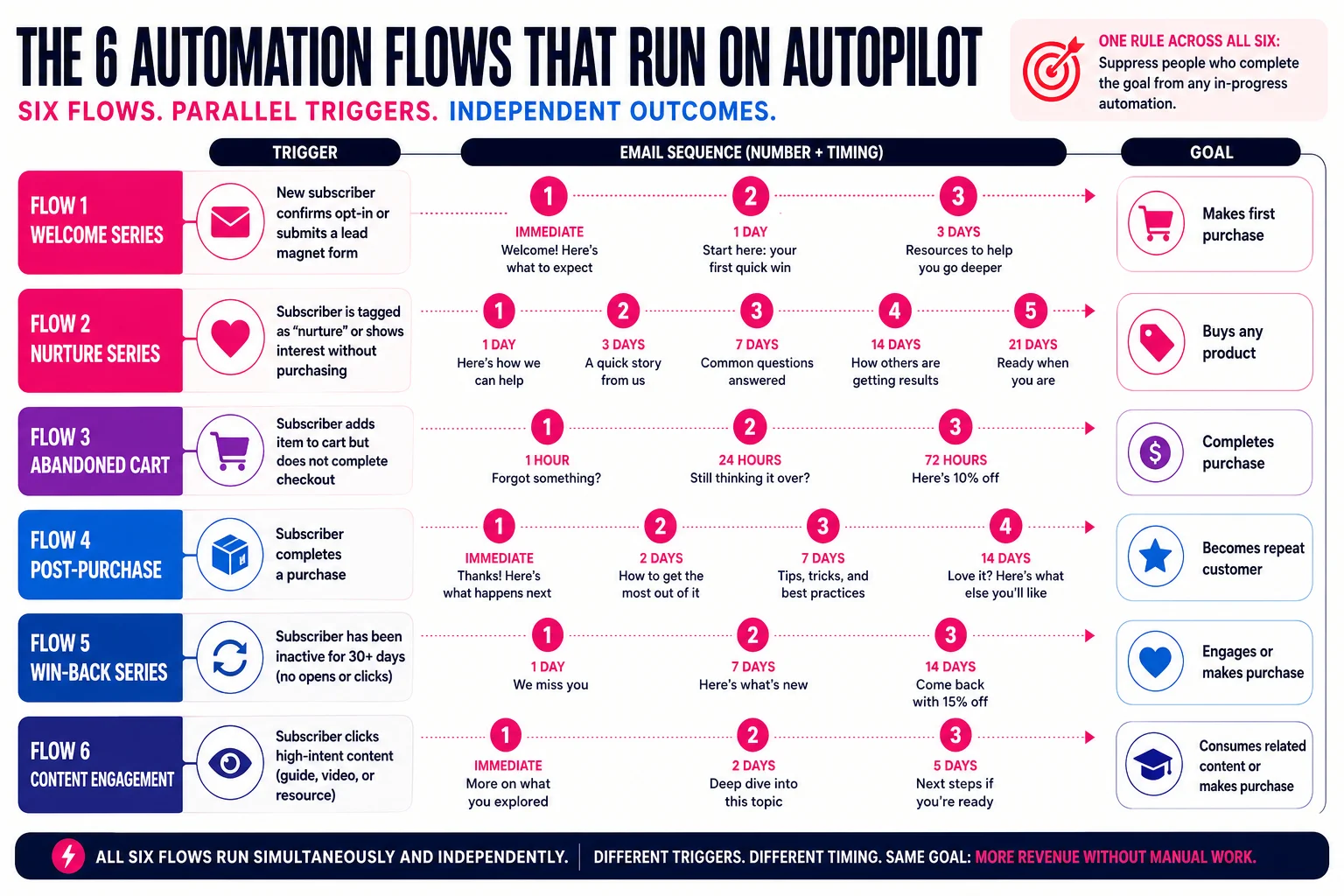
One rule applies across all six: suppress people who complete the goal from any in-progress automation. Nothing burns goodwill faster than sending a discount email two hours after someone already bought.
Flow 1 — Welcome series
Trigger: New subscriber confirms opt-in or submits a lead magnet form Email count: 3 to 5 emails Goal: Deliver the promised value, establish what you do, get a first conversion
Email 1 fires immediately with the lead magnet or promised content. Email 2 sends 2 days later and goes deeper on your core offer or story. Email 3 sends on day 5 or 6 with a soft ask. A 5-email version extends the nurture with social proof and a harder CTA, spaced 3 to 5 days apart. Exit the subscriber the moment they convert.
Sample subject lines: “Here’s the template you asked for.” / “The thing most people get wrong about email strategy.” / “Still thinking it over? Here’s what to know.”
If your welcome series is feeding a newsletter, the Newsletter Generator can help you turn existing content into structured sequences. More on architecture in how to write a newsletter.
Flow 2 — Abandoned cart
Trigger: Item added to cart, checkout not started within 1 hour Email count: 3 emails Goal: Recover the purchase before intent fades
Email 1 sends 1 hour after the trigger, a simple reminder with cart contents and a direct link back. Email 2 sends 24 hours later with social proof (reviews, ratings, return policy). Email 3 sends 48 to 72 hours after the trigger with urgency or an incentive if margins support it. Stop after Email 3 regardless.
Sample subject lines: “You left something behind.” / “3,200 people bought this last month.” / “Last chance — your cart expires tonight.”
Flow 3 — Browse abandonment
Trigger: Subscriber views a product page but does not add to cart Email count: 2 emails Goal: Move low-intent browsers back toward purchase consideration
Email 1 sends 30 to 60 minutes after the page view. Keep it short, show the product, single CTA. Email 2 sends 24 to 48 hours later if they haven’t returned or purchased. Filter out subscribers who already bought the item or where the product is out of stock before sending either.
Sample subject lines: “You were looking at this…” / “Still interested? Here’s what others say.”
Flow 4 — Post-purchase
Trigger: Order confirmation event fires Email count: 4 to 5 emails over roughly 30 days Goal: Reduce buyer anxiety, drive a review, create a second purchase
Email 1 is the order confirmation, sent immediately. Email 2 is the shipping notification. Email 3 arrives 2 to 3 days after estimated delivery to invite a review. Email 4, around day 14, introduces related products. A fifth email on day 30 can offer a loyalty incentive or replenishment prompt for products with a natural reorder cycle.
Sample subject lines: “Your order is confirmed.” / “Your package is on the way.” / “How did it go? We’d love your feedback.” / “Customers who bought this also love…”
Flow 5 — Re-engagement / win-back
Trigger: No click recorded in the last 90 days (60 days for high-frequency senders) Email count: 3 emails Goal: Confirm whether a subscriber still wants to hear from you, then act on the answer
Email 1 is a genuine “still want emails from us?” message with a single re-engagement CTA. Email 2 sends 7 days later with a reason to stay, an offer or exclusive content. Email 3 sends 7 days after that, plain-text, last chance before removal.
If a subscriber doesn’t click anything across all three, suppress or delete them immediately after Email 3. Unresponsive contacts degrade your sender reputation the longer they sit on an active list.
Sample subject lines: “Are you still there?” / “Here’s something worth coming back for.” / “We’re removing you in 48 hours — unless…”
Flow 6 — Newsletter / broadcast
Trigger: Manual or scheduled send to an engaged segment Email count: One send per cadence (weekly, biweekly, or monthly) Goal: Keep the relationship warm between automations; build habit
This is your regular send, not a trigger-based automation, but it belongs in the architecture because its suppression rules affect every other flow. Exclude anyone who received an automated email in the last 48 hours to avoid overlap. If you’re starting from scratch, how to start a newsletter covers the setup side.
Sample subject lines: “The 3 things I’m watching this week.” / “Why we changed our pricing (honest breakdown).” / “What actually works for list growth right now.”
All six flows can run simultaneously for different subscribers. A new buyer might be in the post-purchase flow and the newsletter segment at the same time, so your suppression logic has to account for both.
Writing the emails, personalizing them, and making sure they actually arrive
The six automations from the last section are the skeleton. This section is everything that determines whether those emails do anything once they leave your ESP.
Step 7: Write emails people actually click
Subject lines get the most attention, but the subject line’s only job is to earn the open. Everything after that is on the body copy.
Subject lines and preview text. A good subject line is specific. “Your cart is waiting” does less work than “You left the [Product Name] behind.” Curiosity works when the payoff is real; when it isn’t, it trains people to distrust you. Keep subject lines under 50 characters for mobile, and treat preview text as a second subject line. Litmus puts the sweet spot at 40 to 90 characters, with the key message in the first 40. Write your preheader in HTML explicitly rather than letting the client auto-pull the first line of body copy, which often surfaces something like “View this email in your browser.”
One post-iOS 15 note: open rate is no longer a reliable A/B test metric. Apple’s Mail Privacy Protection pre-fetches emails through a proxy, inflating opens by reported amounts ranging from double to nearly four times the real figure. Measure subject line tests by click-through rate or downstream conversions instead.
Body length by email type. Transactional emails should be short and built for scanning. Nurture emails earn more length, but “more length” means one coherent idea per email, not three half-developed ones. Newsletters are the exception where long-form works, provided the content justifies it.
One CTA per email. Two CTAs don’t double your clicks; they split attention and usually reduce both. If you’re struggling to pick one, the email is trying to do too much.
Voice. Write like a person. The brand voice generator can help you define what that sounds like at scale, and the email pitch generator is useful for drafting from a blank page. If you’re writing true outreach instead of owned-list email, use the cold email template for the right structure first. But no tool fixes copy written from the brand’s perspective instead of the reader’s. Ask yourself: what does the reader get from clicking? Answer that, and you have your body copy.
Step 8: Personalize without being creepy
Personalization works in layers. At the base level, you have token insertion: first name, last product viewed. That’s table stakes. The next tier is segment-based content, where different groups see different emails based on behavior or purchase history. Above that is behavioral triggering, which is what the automations from Step 6 do.
The creepy line is easier to cross than people expect. A pattern that backfires: referencing a specific product someone viewed weeks ago with framing like “We noticed you were looking at this.” The person barely remembers visiting. Now they feel surveilled. The data was accurate. The timing and framing made it feel wrong.
Personalization should feel helpful, not observational. Use behavioral data to make the email more relevant, not to demonstrate how much you know. “Based on what you’ve bought before, you might like this” reads differently than “We saw you looking at this.”
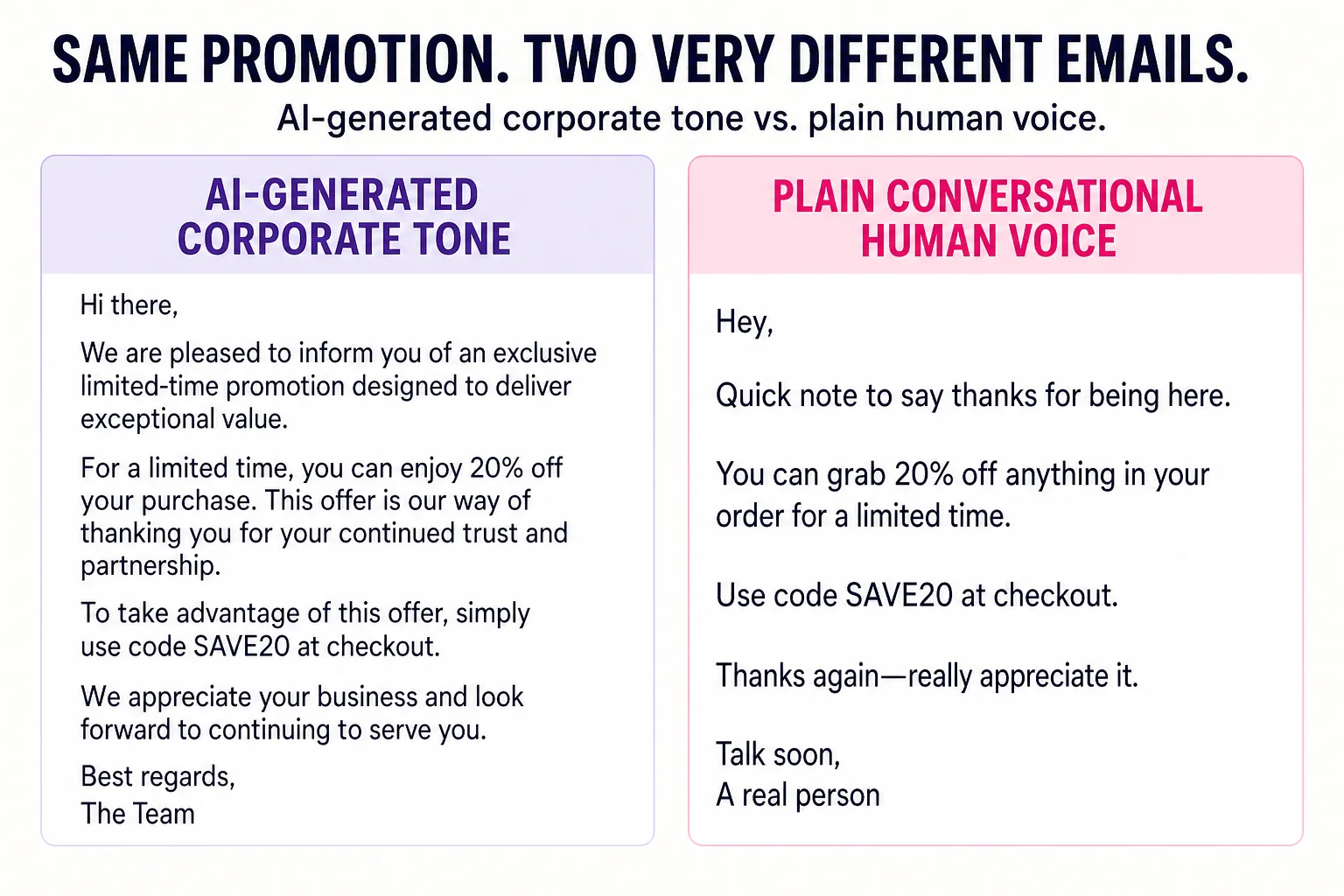
AI helps with personalization at scale for product recommendations and dynamic content blocks. It creates problems when you use it to generate entire emails meant to sound individual. The result is usually copy that’s slightly too smooth and noticeably un-human. The AI marketing guide covers where AI fits the broader stack, and the Marketing Operating System includes the email-specific workflows.
Step 9: Deliverability is the unsexy thing that breaks everything else
Every automation you built, every subject line you tested, every segment you defined, all of it lands in spam if your deliverability is bad.
Authentication: SPF, DKIM, and DMARC. These three DNS records verify that your ESP is authorized to send on your domain’s behalf. SPF specifies which servers can send from your domain. DKIM adds a cryptographic signature to each email. DMARC tells receiving servers what to do when either check fails, and routes aggregate reports back to you. Without all three, major providers treat your mail as unverified. Gmail and Yahoo now require DMARC for bulk senders as a baseline condition. Set all three on a custom sending domain, not the default ESP subdomain.
List hygiene. Hard bounces hurt your sender reputation immediately. Suppress them after the first occurrence. Run your list through a validation tool before any large send to a cold or aging segment. The re-engagement flow from Step 6 isn’t optional: removing subscribers who haven’t clicked in 90-plus days keeps your engaged-to-unengaged ratio healthy, which is what inbox providers actually measure.
Warming a new sending domain. Start with your most engaged subscribers, around 200 to 500 contacts, and scale volume over two to three weeks. Gmail’s Postmaster Tools and Microsoft’s SNDS give you domain and IP reputation data in near-real time so you can watch whether warming is working.
Blacklists and recovery. If your domain or IP lands on a blacklist, use Mail-Tester to diagnose the issue, then go directly to the blacklist operator’s delisting process. MXToolbox identifies which lists you’re on. Recovery usually takes one to two weeks after fixing the underlying problem, typically a spam complaint spike or a batch of invalid addresses.
Authenticate correctly, keep your list clean, and don’t send irrelevant email to people who never asked for it, and you’ll never have a serious problem. The programs that end up on blacklists almost always got there by ignoring one of those three things for months.
Stop measuring opens and start measuring money
Metrics that lie
Open rate is the most widely reported email metric and, post-iOS 15, the least trustworthy one. Apple’s Mail Privacy Protection pre-fetches emails through a proxy server before the recipient ever sees them, which inflates reported opens by a significant and unknowable margin. Some senders saw their open rates double overnight when iOS 15 launched. The number didn’t reflect reality then, and it still doesn’t.
The instinct to replace open rate with click-through rate (CTR, calculated as clicks divided by deliveries) is understandable but only partially solves the problem. CTR is a list-level metric. It tells you how a send performed across your entire audience, but it can’t isolate whether the email content itself was compelling, because it doesn’t control for how many people actually saw it.
Metrics that matter
Click-to-open rate is the better diagnostic metric at the email level. CTOR = (unique clicks / unique opens) x 100. Yes, the open count is inflated by MPP, but because CTOR is a ratio, inflated opens affect it consistently over time. That means CTOR is still reliable for comparing two subject lines, two CTAs, or two content formats against each other. MailerLite’s benchmark data puts the overall campaign median CTOR at around 6.8% across 3.6 million campaigns, with e-commerce sitting lower at roughly 4%.
Use CTOR to diagnose content and CTA effectiveness. Use conversion rate (conversions divided by clicks, tracked through your site) to measure actual business impact. Revenue per recipient (RPR), calculated as total email-attributed revenue divided by the number of recipients, is the cleanest single number for comparing the business value of different sends or flows. An abandoned cart flow generating $3.65 RPR versus a general campaign at $0.11 RPR tells you where to invest your time immediately.
Connect email clicks to your analytics setup using UTM parameters, and use the Google Analytics event tracking code generator if you want to generate the tracking code without doing it manually every time.
Reporting cadence
Weekly: check CTOR and unsubscribe rate for any sends that went out. Flag anything below your baseline.
Monthly: pull RPR by flow, overall list growth rate, and conversion rate by segment. Compare to the prior month.
Quarterly: audit your full automation architecture. Are your win-back emails actually recovering anyone? Is the post-purchase sequence generating repeat orders? Kill or rebuild flows that haven’t improved in two consecutive quarters.
A/B testing rules
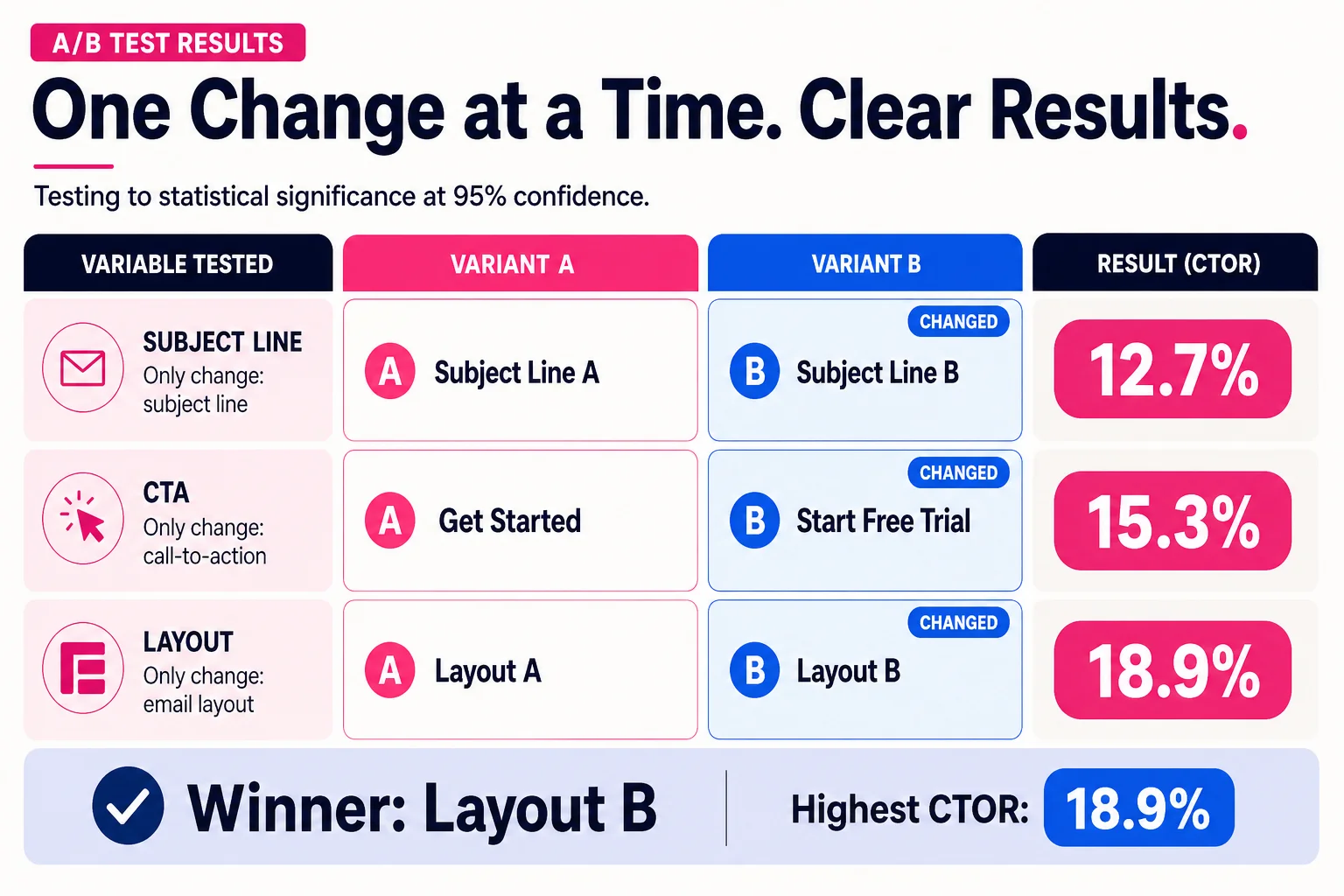
Test one variable per experiment. Subject line tests need at minimum 1,000 recipients per variant to produce usable signal. Measure winner by CTOR or downstream conversion, not opens. Run the test to statistical significance before calling it; most ESP-native testing defaults to 95% confidence, which is fine. Don’t test radical changes against each other. If you change the subject line, the CTA, and the layout simultaneously and one variant wins, you learned nothing.
Email marketing strategy by business type
The ten steps above apply to everyone. What changes is which automations matter most, which segments drive the most revenue, and which metrics you should live by.
B2B SaaS
Your primary automations are the welcome/onboarding sequence and a trial-to-paid conversion flow. Abandoned cart doesn’t apply; what does apply is a feature-adoption drip that fires based on which parts of the product a user has or hasn’t touched. Segment by plan tier, company size if you have it, and activation status (did they complete the core setup action?). The highest-value segment to email is users who signed up, completed setup, but haven’t upgraded. They know the product works.
B2B CTOR benchmarks average around 5.6%, with CTR in the 2-4% range. Your primary success metric is trial conversion rate, not opens. Keep bounce rate below 3% and spam complaints below 0.1%, both of which matter more in B2B because you’re often emailing business domains with aggressive filtering.
E-commerce
The abandoned cart and post-purchase flows from Step 6 are where you win or lose. Segment by purchase frequency (one-time buyers versus repeat buyers), AOV tier, and product category. One-time buyers who spent above your average AOV are your highest-priority re-engagement target.
Track RPR by flow, not just by campaign. The performance gap between your automated flows and your broadcast campaigns is the number that tells you whether your automation investment is working. An e-commerce program without functioning cart abandonment is leaving money on the table every single day.
Creator and newsletter
Your engagement health metric is CTOR, with a target north of 10%. The median sits around 6.8%, so 10% means your content is doing real work. Segment your list by engagement tier (clicked in the last 30 days versus 31-90 days versus 90-plus days) and treat them differently. Highly engaged subscribers are sponsor inventory; protect that segment above everything else.
Automate your welcome sequence to set expectations clearly. If your newsletter goes out Thursdays, say that in email one. Subscriber churn from unmet expectations is a preventable problem.
Agency and services
Your highest-value automation is a lead nurture sequence that fires after a content download or contact form submission. Segment by service line interest and deal stage if your CRM supports it. Primary success metric is meetings booked or proposal requests, tracked as conversion events in your analytics.
Send frequency matters more here than in other verticals. Emailing a prospective client every three days when they filled out a contact form two weeks ago is how you end up in the spam folder and lose the deal. One email per week during active nurture is usually the ceiling before it starts working against you.
What kills most email programs (and how to leave here with a real one)
Mistakes worth avoiding
Sending to your full list every time. Segmentation exists for a reason. Blasting everyone with the same message suppresses your CTOR, inflates your unsubscribe rate, and trains your best subscribers to ignore you.
Optimizing for open rate. If you’re still making decisions based on open rate, you’re optimizing a number Apple’s Mail Privacy Protection broke. Use CTOR and RPR instead.
Building automations without exit conditions. If someone buys the product you’re pitching in email three of your abandoned cart flow, they should exit immediately. Sending a discount code after they already paid is embarrassing and wastes revenue.
Sending from a brand-new domain at full volume. Inbox providers don’t know you yet. Warm up over four to six weeks or you land in spam.
Writing subject lines for opens, not for the right people. A clickbait subject that spikes opens but tanks conversion hurts your RPR and trains subscribers to distrust you.
Ignoring unsubscribe and spam complaint rates. Above 0.5% unsubscribes per send is worth investigating. Above 0.1% spam complaints is an emergency.
Treating frequency as fixed. Start at one to two emails per week, segment by engagement, and let behavior tell you who wants more.
FAQ
What is a good email open rate? Reported open rates in 2025 run 34–43% across industries, but Apple Mail Privacy Protection pre-fetches emails before a human ever sees them. True human open rates are likely closer to 15–25%. Track CTOR and RPR instead.
How often should I send marketing emails? One to two per week for most businesses. E-commerce can handle two to three. B2B SaaS should stay closer to one to four per month. Above five per week reliably raises spam complaints regardless of list quality.
What is revenue per recipient (RPR) and how do I calculate it? RPR = total email-attributed revenue / number of recipients. A $3.65 RPR on an abandoned cart flow versus $0.11 on a general broadcast tells you exactly where to spend your time.
Which ESP should I use? E-commerce: Klaviyo or Omnisend. B2B SaaS: Bento, Drip, or ActiveCampaign. Creator or newsletter: Kit or Beehiiv. Beginners: Mailchimp or MailerLite. None of them fail if your strategy is solid; all of them fail if it isn’t. For deeper platform comparisons, see Mailchimp alternatives, MailerLite alternatives, Kit / ConvertKit alternatives, Substack alternatives, and beehiiv alternatives.
How do I know if I have a deliverability problem? Watch for sustained reported open rates below 25%, a spike in soft bounces, or spam complaints above 0.1%. Check sender reputation with Google Postmaster Tools and Mail-Tester. Confirm SPF, DKIM, and DMARC are passing before you troubleshoot anything else.
What to do next
Download the email strategy template to put the ten steps into a working document your team can actually use:
If you run a newsletter or content-driven list, Newsletter Generator turns a topic into a structured issue without the blank-page paralysis.
For the newsletter layer specifically, use how to start a newsletter for setup, how to write a newsletter for structure, email newsletter ideas for topic planning, newsletter statistics for benchmark reality checks, and the free newsletter generator when you need a draft from an existing topic.
When you’re ready to pitch brands or sponsors, use the cold email template to structure the message, then let the Email Pitch Generator build outreach emails from your list stats and positioning.