
At ClickMinded, we send approximately 7 million emails a year, and more than 70% of our revenue comes from our email list.
Our email service provider (ESP), is our customer relationship manager, our command center, our entire foundation. All of our automations flow through it, and our entire business operation rests on it.
So I do not say this lightly: after building our company on Drip for the last 5 years, and in preparation for the AI era, we’ve decided to move everything over to Bento.

When we need to send an email (a promo, a product launch, the weekly newsletter), this is what we do: tell Claude or ChatGPT what we want in plain English. A few minutes later a finished draft is sitting inside our email platform, written in our voice, with our formatting rules already applied. We review it, pick the audience and send time, and hit send.
No drag-and-drop builder fighting us over a two-column layout. No copying a subject line out of a chat window and pasting it into a campaign editor. No archaeology expedition through six reporting tabs to figure out why our opens rates dropped in March.
If you’re on our list, the emails you’ve been getting from us lately were made exactly this way.
If you read about how we ditched WordPress for an AI-native site, this is the same story with a different villain. Email platforms were designed for a human to operate one screen at a time: open the builder, find the right group of subscribers, edit the email, check the automation, repeat until retirement. Then AI got good enough to do that work, and the click-around design became the bottleneck. Bento is built the other way around: an AI can operate almost all of it, and you keep the decisions that matter. Who gets the email, what it says, when it goes out.
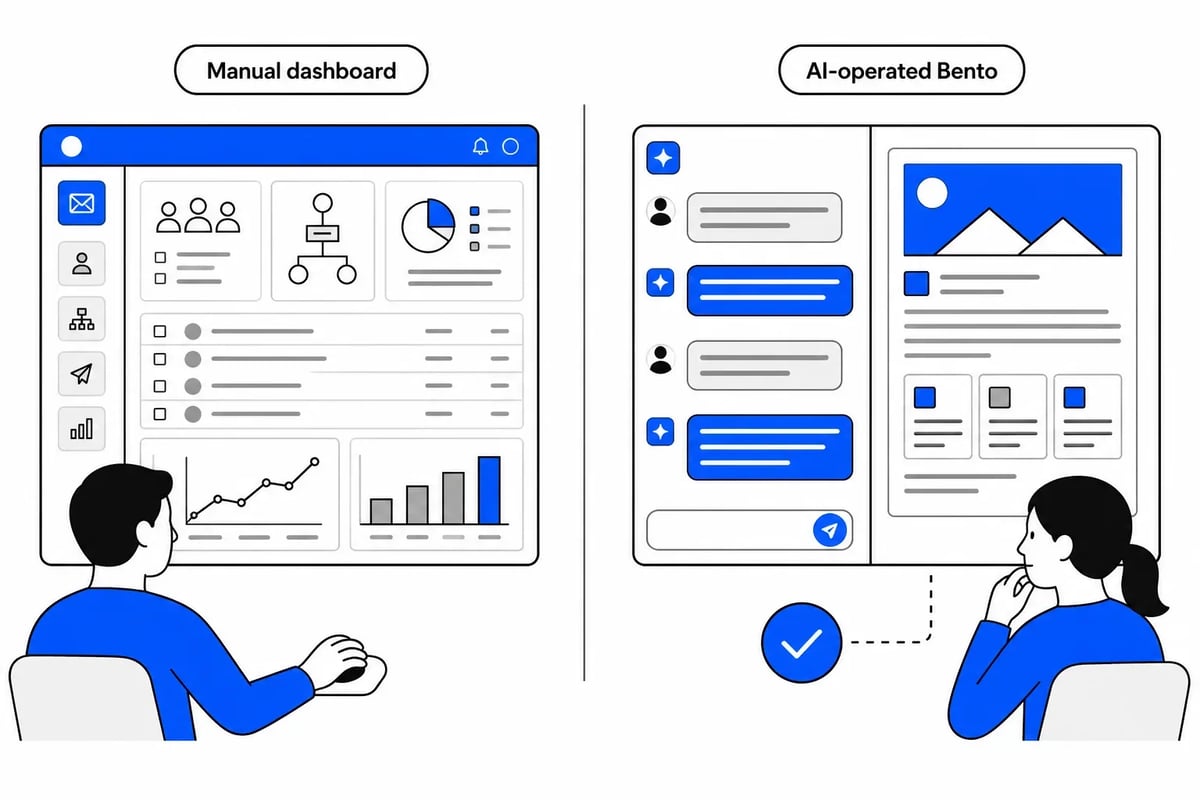
How AI “talks” to an AI-native email platform (like Bento)
You know how you chat with Claude or ChatGPT and it answers questions? An MCP is how a tool like Bento plugs into that chat, so the AI can actually do real work inside your Bento account.
MCP stands for Model Context Protocol, which is a fancy name for a plug between an AI and a tool like Bento. Claude or ChatGPT on their own can only give you the email text. Plug them into Bento with the MCP, and they can actually build the campaign so all you need to do is click “send.”
Bento runs an official MCP connection that Bento hosts itself, so there’s nothing to install. Setting it up takes like 3 minutes and, once connected, Claude or ChatGPT can look up subscribers, read your stats, list your campaigns, and create new ones inside your account.
Here are a few cool things you can do once AI can use your ESP for you.
Idea #1: Ask the AI what’s actually working and what isn’t
This is a simple but extremely powerful task to hand your AI.
Every email platform gives you dozens of charts and dashboards. How much time do you actually spend making sense of them beyond looking at open and click rates?
Giving AI access to your ESP analytics allows you to ask more important questions like: “what can we learn from all this data and what should we do about it?”
Because the MCP connection lets Claude see your sends, your sequences, your subscribers, and your stats, you can ask exactly that:
“Analyze our last two newsletter sends. Which links did people actually click, and what should that change about our next issues?”
Here’s what came back from our real account.
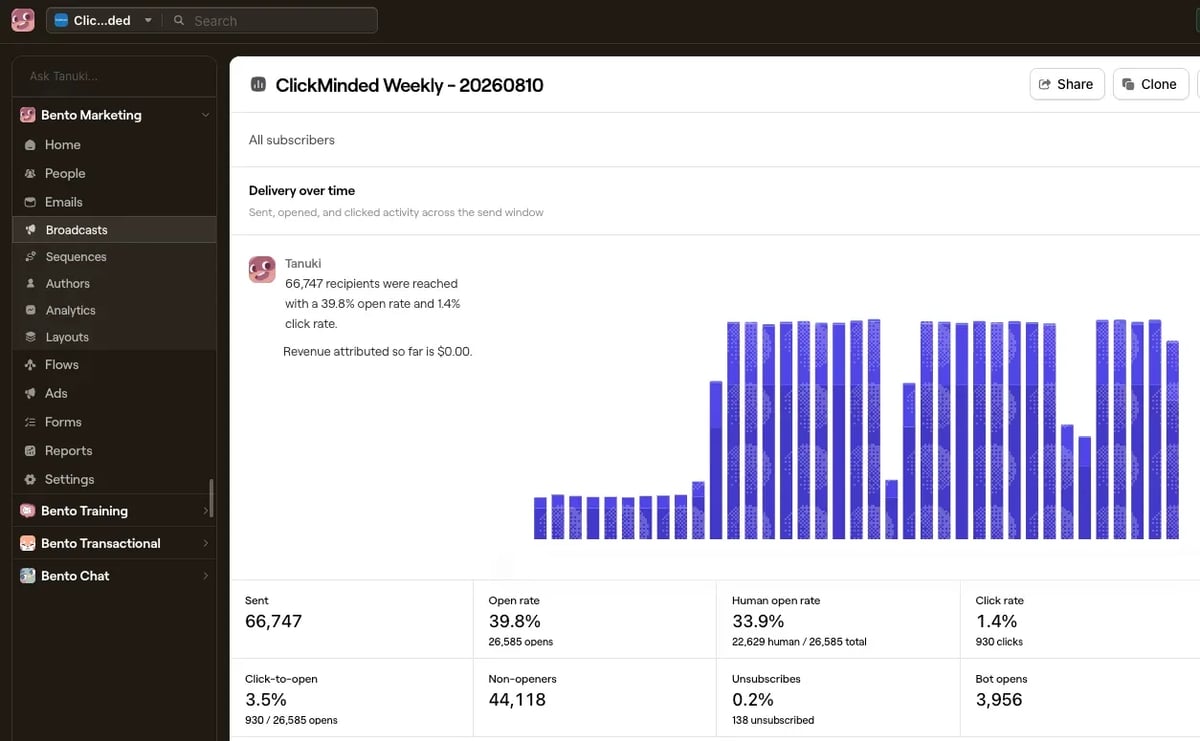
- Both newsletters reached about 66,600 subscribers, with 35 to 40 percent open rates.
- The most-clicked links in both were practical, do-something content: a ChatGPT prompts guide and our own prompt-engineering tutorial in one issue, a de-risk-your-SEO guide in the other.
- Pure news links came last, every time.
The AI also caught something we would have missed: almost every link showed a suspiciously similar number of raw clicks. That’s a sign of email security scanners, robots that “click” every link in every email they inspect. Take the robot clicks out, and the honest number is how many real people clicked: about 1,150 on one issue, 930 on the other. Bento’s own reporting agrees. It splits human opens from robot opens right on the report page, which most platforms never show you.
The takeaways for our next sends: lead with practical guides, keep featuring our own tutorials (top-3 clicks both weeks), and judge every issue on unique clickers, not raw clicks.
Idea #2: Let AI write and set up email campaigns for you
The old way to send a broadcast campaign: open the builder, pick a template, write the email, fight the builder, preview it, fix the mobile version, schedule it. Somewhere between 45 minutes and the heat death of the universe.
Our way: we tell Claude or ChatGPT what we want.
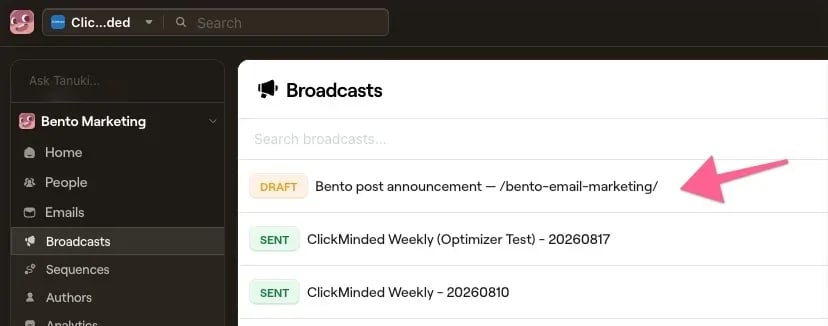
“Create a broadcast announcing our new post about how we run our email marketing by chatting with AI. Make it meta: this email should itself be an example of the thing the post describes. Link to the post https://www.clickminded.com/bento-email-marketing, keep our voice, no hype.”
Our AI already knows our business and our brand voice. Now it knows how to use our ESP too.
That’s the prompt we used to send the announcement for this very post. A few seconds later, a draft was sitting in our Bento account, waiting for our review. No copy-pasting from ChatGPT.
Idea #3: Have AI build workflows that grow your business on autopilot
Automations in Bento are called Flows: welcome sequences, abandoned-cart reminders, campaigns that win back people who stopped opening. The things that make email marketing actually profitable, and the things most people never set up because building them means an afternoon of dragging boxes and connecting arrows.
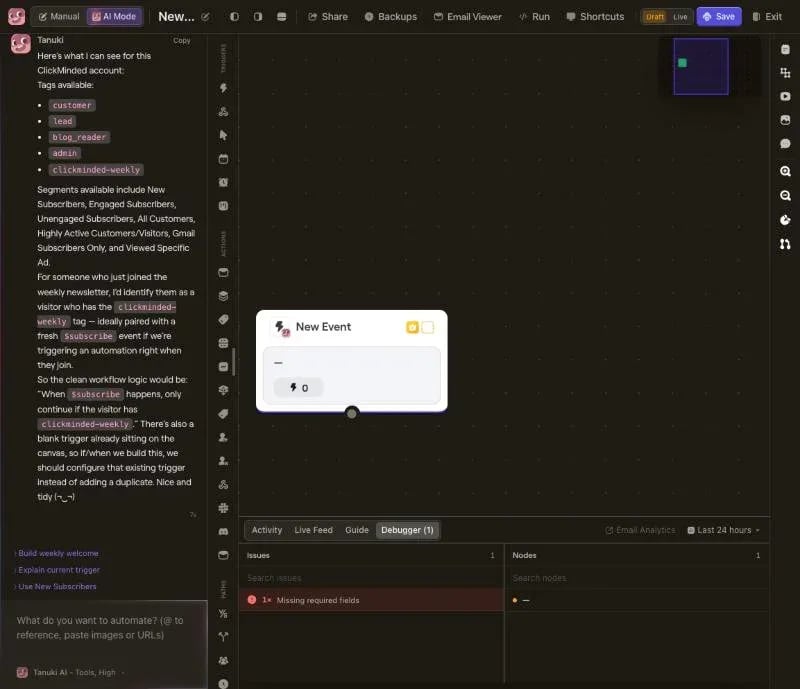
For Flows you don’t even need Claude or ChatGPT. Bento has an AI builder inside the product, named Tanuki (sidenote: named after an adorable Japanese raccoon dog). And you can just have a conversation with it about what you want to build. Here’s the actual one we had while building the welcome sequence for our newsletter subscribers.
We started by testing what it knew:
“Before we build anything, tell me what you know about this account: what tags do we have, and how would you identify someone who just joined our weekly newsletter?”
Tanuki answered with our actual setup: all of our tags, our subscriber groups, and the right starting rule, unprompted: when someone new signs up, only continue if they have our newsletter tag.
Then we asked the question that actually matters with automations:
“When this goes live, how do we make sure the 66,000 people who ALREADY have the newsletter tag don’t all get dumped into the sequence?”
Tanuki explained the danger itself: if the sequence starts for anyone who has the newsletter tag, all 66,000 existing subscribers would suddenly start getting “welcome” emails. So it set it up the safe way: the sequence only starts when someone new signs up, and everyone who enters gets marked so they can never accidentally go through it twice.
If we had built this ourselves, we would’ve probably ended up sending the welcome email to all 66,000 longtime readers. Bento’s own AI caught it before we built anything.
Then we told Tanuki to build the welcome sequence. It set up the starting rule, added those safety markers, created five emails spread over 14 days, and wrote a draft of each one, including a day-14 email about our products. Everything it built shows up as steps on a canvas you can click and change.
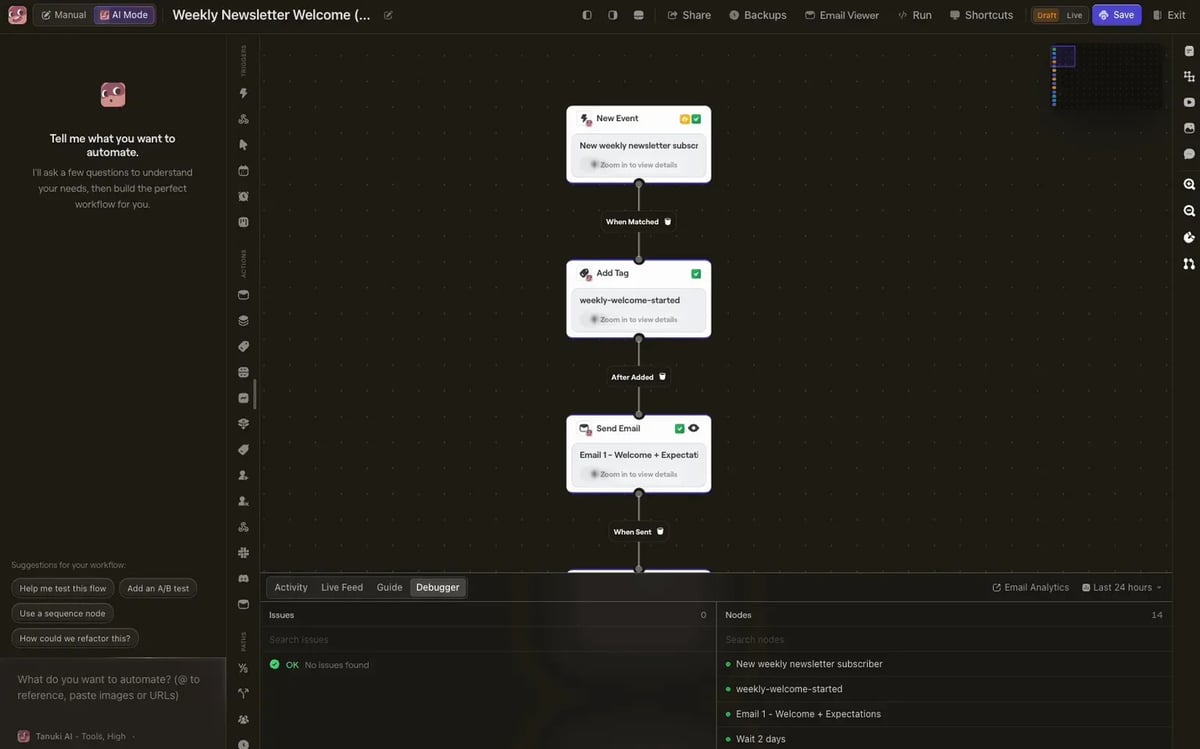
The flow is sitting in draft while we review the copy and test the links.
Learning to use a new ESP is so 2025
Read Bento reviews and one criticism shows up: it’s technical and has a learning curve. That’s what G2 reviewers say, and they still rate it 4.8 out of 5.
But here’s the thing: the learning curve matters if you plan to click every button yourself. We mostly don’t. The AI operates Bento. We describe and review.
Older email tools made the opposite trade. Easy for a human to click through, nearly impossible for software to operate, because the API they give other programs only reaches a fraction of the features. Bento’s API reaches most of the account: subscribers, events, emails, broadcasts, stats. So our AI can work with all of it.
Right now you can’t create Flows through the API or the MCP; although our sources tell us it’s coming (aka, we read it on their Discord). But it doesn’t matter much in practice, because Tanuki, Bento’s built-in AI, builds Flows inside the product from a plain-English description, like we showed with the welcome sequence. Either way, you’re not the one dragging the boxes.
Pro tip: AI tools like Claude and Codex can also use a web browser. So for anything the MCP doesn’t reach yet, we can have Claude open our Bento account in a browser and talk to Tanuki directly. Our AI giving instructions to Bento’s AI. The future is bright (and kinda scary?)
We should probably learn how to use Bento, but we’re not in 2025 anymore.
How to tell if your ESP is AI-native
Quick story about how we got here. We used Drip for years (before, we used like 6 others including Mailchimp, Kit, ActiveCampaign), and we were happy with it. Solid tool, solid features, no complaints worth writing about, right up until early 2026.
This year, we’ve drastically changed how we work.
More and more of building and growing ClickMinded had gone “agentic”: AI does the grunt work, we focus on the high-level, high-impact decisions. Every tool we use started getting measured against one question: can an AI operate this for us? And that’s where Drip, through no fault of its own, became the bottleneck.
The problem was how little of it an AI could reach.
A lot of what you can do in Drip’s dashboard simply isn’t reachable through its API or its MCP (which is still in beta). Until recently you couldn’t even create a one-off broadcast through the API. You still can’t build or edit a workflow through it: you still have to build it all manually through the dashboard. And there’s no built-in AI like Tanuki to build workflows from plain English.
Drip has been shipping improvements, but slowly, which is what you’d expect from a very established platform with a lot of customers to keep stable.
None of that matters if you plan to click through and learn to use your ESP yourself. It matters enormously if you want an AI to do it for you. So here’s the checklist we’d use today:
- Can an AI connect to it at all? Look for an official MCP, or at minimum a full API. If the only way in is the dashboard, every idea in this post is off the table.
- Does the connection reach the whole product, not just sending? Reading and writing: subscribers, tags, broadcasts, sequences, stats. A send-only connection lets the AI mail people but never think about them.
- Can the AI create things, not just read them? Simplest test in the world: connect your ESP to Claude or ChatGPT and ask it to create a draft broadcast. If it can’t, you have your answer.
- Is there built-in AI for the parts the connection doesn’t reach yet? Automations are the hardest thing to open up to outside software. A Tanuki-style builder inside the product covers that gap.
- Are the docs written for AI to read? Bento, for example, publishes a ready-made onboarding doc for AI agents: paste it into your AI and it learns the whole API in one go.
- How fast is the vendor shipping agent features? Check the changelog or the community. In this category, six months of silence is a verdict.
Run your current ESP through that list. If it fails the first three, it isn’t a bad tool. It’s a tool from the pre-2025 era, before AI could do the work.
ClickMinded is already building integrations with AI-native ESPs
If you’ve used the ClickMinded Newsletter Generator, you know it’s the tool that produces our weekly newsletter: it researches the week’s stories, writes the issue in our voice, checks the facts, and lays out the finished email. It’s a production tool, not an email platform. Bento is the platform.
We built an integration so that when the Newsletter Generator finishes a new issue, we just click a button and the draft lands in our Bento account, ready for the same review-and-send routine as everything else. Bento then handles the subscriber list, the automations, the receipts-and-password-resets kind of email, and the reporting for everything we send, newsletter and otherwise.
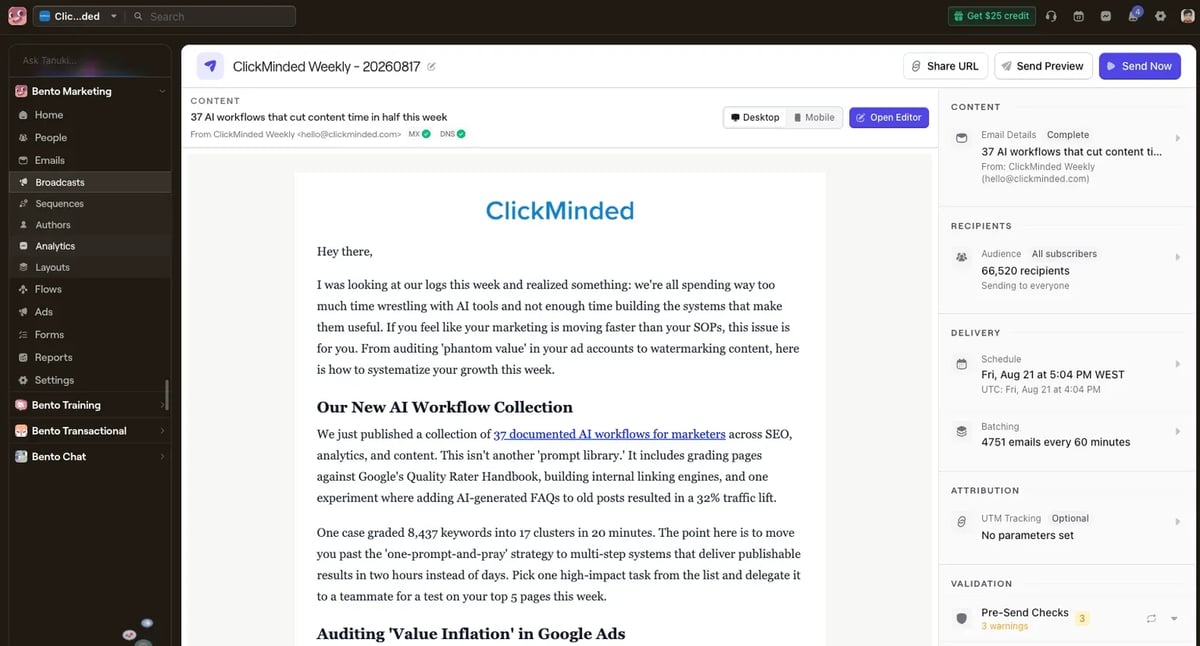
The Newsletter Generator produces the content. Bento sends it. We sit in the middle approving things.
Frequently asked questions about Bento
Is Bento beginner-friendly? If you plan to click through every screen yourself, expect a learning curve; the G2 reviewers aren’t wrong. But the setup in this post mostly removes it. You describe what you want in plain English, the AI operates Bento, and your job is reviewing the audience, message, and timing before anything sends.
How much does Bento cost? $29 per month for up to 5,000 Active Users at the time of writing. An Active User is a subscriber or someone who did something trackable in the last 30 days. Nothing is locked behind a bigger plan: automations, the AI Flow builder, and the deliverability tools are all in at the entry price, and past 5,000 the price per person gets cheaper as your list grows. Receipts and password resets are priced separately by usage.
Can Bento send cold email? No. Bento is for opt-in lists: people who subscribed, grabbed a lead magnet, or bought from you.
Does Bento work with ChatGPT and Claude? Claude and Codex (ChatGPT) are officially supported through Bento’s MCP connection, and the docs cover Cursor and VS Code too.
The Future of Marketing Is Agent-First
Our switch to Bento reflects a broader change in how we choose software. Most tools were designed around humans clicking through dashboards. AI-native, agent-first tools can be operated through plain-English instructions: we say what we want, the AI handles the interface, and we review the result.
That doesn’t mean handing over the strategy or sending emails without oversight. We still decide what to say, who should receive it, and when it should go out. The AI simply does more of the setup and repetitive work inside Bento.
We’re excited to keep exploring and moving to more AI-native, agent-first tools when they genuinely improve how we work. People set the strategy and approve the work. AI handles more of the interface.